How to Clean Xbox Disc: Safe Cleaning Guide
Learn a safe, step-by-step method to clean an Xbox disc and restore readability. This practical guide covers materials, techniques, and common mistakes for homeowners and renters.


To clean an Xbox disc, handle the disc by the edges, use a microfiber cloth, and wipe from the center toward the edge with light, uniform pressure. Use distilled water or mild soap if needed, and avoid harsh chemicals. Let the disc dry completely before testing in your console carefully.
Why clean Xbox discs matter
Dirt, fingerprints, and dust on your Xbox game disc can cause read errors, skip frames, or even fail to load. The data layer on a disc is delicate, and oils from fingers can create a temporary film that hinders optical reading. While discs are resilient, repeated handling without proper cleaning can accumulate grime that irritates the laser in the Xbox drive. If you’re researching how to clean xbox disc, you’ll find that a simple, safe method can restore readability without risking further damage. According to Cleaning Tips, using gentle materials and the correct technique minimizes the chance of scratches or embedding residue. Regular, careful cleaning preserves play time and minimizes frustrating read errors in busy homes.
This approach is designed for the type of consumer cleaning you can do at home with minimal tools. You don’t need expensive equipment—just a clean workspace, a soft cloth, and a little patience. A properly cleaned disc not only improves the chance of it being read by the console but also helps extend the disc’s usable life by removing grime that can degrade the data surface over time.
What you need before you start
Preparation matters. Gather a small, dedicated kit so you don’t introduce extra contaminants to the data surface. The aim is to remove grime with minimal moisture and friction. For most discs, a microfiber cloth and either distilled water or a mild soap solution are sufficient. Optional items include isopropyl alcohol (70%) for stubborn residues, cotton swabs for edge cleaning, and a clean flat surface to lay the disc on. Never apply liquids directly to the disc; instead, dampen the cloth lightly and wipe. Keep the workspace clean and free of dust that could transfer to the disc during cleaning. This setup aligns with general safe cleaning principles from Cleaning Tips, emphasizing gentle, controlled actions over aggressive scrubbing.
As you assemble your kit, remember that the goal is to remove grime without penetrating the data layer. If you’re unsure about using alcohol, you can perform a test on a less valuable disc first. Always practice good hand hygiene to minimize oils on the surface and avoid wiping across the label side, which can wear or smear markings.
Safe cleaning methods in detail
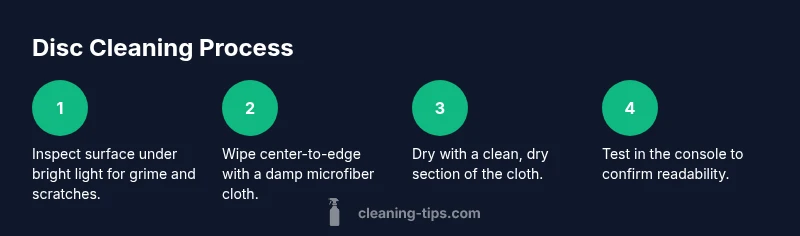
Begin with a clean, dry microfiber cloth. Hold the disc by the outer edge to avoid fingerprints on the read surface. Wipe in a center-to-edge motion with even, light pressure. Use straight-line strokes rather than circular motions to minimize potential circular scratches. If the disc is very dirty, lightly dampen the cloth with distilled water or a tiny amount of mild soap mixed with water and continue with center-to-edge wipes. After cleaning, switch to a dry section of the cloth and wipe in the same center-to-edge pattern to lift any remaining moisture. Do not saturate the disc; moisture should not pool on the data surface.
For stubborn grime, dampen a cotton swab slightly with isopropyl alcohol (70%), then gently dab the residue around the hub area and edge. Avoid contact with the readable surface for extended periods and never apply alcohol directly to the disc in a large amount. Always finish with a thorough dry wipe using a clean cloth. Once finished, set the disc on a dry, lint-free surface until completely dry before testing in your console.
Troubleshooting unreadable discs after cleaning
If your console still can’t read the disc after cleaning, inspect for visible scratches, warping, or warping around the hub. Light surface scratches can sometimes be improved with a second, careful cleaning, but deep scratches may require disc resurfacing or replacement. Ensure the disc is completely dry; moisture can cause temporary read errors that mimic deeper issues. Do not attempt aggressive scrubbing or abrasive cleaners, which can worsen scratches. If the disc remains unreadable, switch to a backup copy or contact the publisher for repair options. Remember, a well-cleaned disc should feel smooth and dry to the touch with a free, clear data surface.
Maintenance to prevent future grime
Prevention is better than cure. Store discs in protective cases away from direct sunlight, dust, and heat sources. Handle discs by the edges and avoid touching the data surface with fingers. Clean your hands before handling a disc, and regularly dust the console’s disc tray area to prevent debris transfer. Create a small cleaning kit specifically for game discs to avoid cross-contamination with kitchen or bathroom cleaners. By adopting these simple habits, you’ll keep discs cleaner longer and reduce the frequency of cleanings.
Authority sources and further reading
For general safety and cleaning guidelines, many reputable sources advocate gentle cleaning practices and avoiding harsh chemicals on delicate surfaces. You can review the following resources for broader cleaning safety principles:
- https://www.nist.gov
- https://www.cdc.gov
- https://www.consumer.ftc.gov
Tools & Materials
- Microfiber cloth(Lint-free; use a new or freshly cleaned cloth.)
- Distilled water(Use in a spray bottle or to dampen the cloth.)
- Mild dish soap(Optional for very dirty discs, use a tiny amount in water.)
- Isopropyl alcohol 70%(Dampen cloth slightly; avoid liquid on the disc.)
- Cotton swabs(For edges and hub area.)
- Flat, clean workspace(Prevents dropping and contamination.)
Steps
Estimated time: 5-10 minutes
- 1
Inspect and segregate
Place the disc on a clean, dry surface and inspect under bright light for visible dirt, fingerprints, or scratches. This initial check helps you decide whether cleaning is needed and what technique to use. Avoid touching the data surface during this step.
Tip: Handle the disc by the outer edge to prevent fingerprint transfer. - 2
Assemble and prepare materials
Set out your microfiber cloth, distilled water (or mild soap solution), and any optional tools in a clean area. This reduces the chance of cross-contamination with other cleaning products.
Tip: Don’t mix cleaners in a single container; use them separately as needed. - 3
Wipe with center-to-edge motion
Gently wipe the data surface from the center toward the edge using a clean, slightly damp cloth. Use straight lines rather than circular motions to minimize the risk of circular scratches.
Tip: Keep the cloth flat and avoid pressing hard. - 4
Dry and recheck
Use a dry portion of the cloth to remove any remaining moisture with the same center-to-edge motion. Inspect again under light to ensure no moisture or residue remains.
Tip: A dry, lint-free cloth yields the best, scratch-free finish. - 5
Address stubborn grime
If residue persists, dab a cotton swab with a tiny amount of isopropyl alcohol and gently target the affected area around the hub and edge. Wipe away with a dry cloth immediately.
Tip: Do not oversaturate; moisture on the data surface can cause issues. - 6
Test the disc in your console
After complete drying, insert the disc into the Xbox to verify readability. If it still fails, consider a second gentle cleaning or replacement.
Tip: Always test after fully drying to avoid introducing moisture into the drive. - 7
Safely store for next use
Return the disc to its case after testing to prevent new fingerprints and dust buildup. Maintain your cleaning kit for future use and consistent results.
Tip: Keep your cleaning kit separate from kitchen or bathroom supplies to prevent cross-contamination.
Questions & Answers
Can I use alcohol to clean an Xbox disc?
Yes, a small amount of isopropyl alcohol (70%) on a damp cloth can help with stubborn grime. Do not apply liquids directly to the disc and always dry thoroughly afterward.
You can use a tiny amount of alcohol on a damp cloth, but never pour liquid on the disc, and be sure it’s fully dry before testing.
What should I do if the disc still won’t read after cleaning?
If readability doesn’t improve, check for deep scratches or warping. Light scratches may respond to another gentle cleaning, but severe damage often requires replacement.
If it still won’t read after cleaning, there might be a deeper scratch or warp; you may need to replace the disc.
Is it safe to clean the label side?
No. Do not wipe the label side; it contains printed artwork and information that can wear off easily. Only clean the data surface (the shiny side) if you must.
No, never clean the label side—only the data surface should be cleaned.
Can I use dish soap and water?
A tiny amount of mild dish soap with distilled water is acceptable for very dirty discs. Use minimal soap and ensure the disc is thoroughly wiped and dried.
Yes, a little dish soap with water is fine if you rinse and dry well.
How should I dry the disc after cleaning?
Dry with a lint-free microfiber cloth using center-to-edge motions until completely dry before testing.
Use a clean, dry microfiber cloth and wipe from center to edge until dry.
Watch Video
The Essentials
- Handle discs by the edges to avoid fingerprints
- Use a soft microfiber cloth and center-to-edge motion
- Dry completely before testing in the console
- Avoid harsh solvents and direct liquid application
- Store discs properly to prevent future grime