How to Check Clean Air Zone: A Practical Guide
Learn how to verify Clean Air Zone status, interpret results, explore exemptions, and plan compliant routes with a clear, step-by-step approach tailored for homeowners and drivers.


Your quick guide will show you how to determine if you will travel through a Clean Air Zone, verify whether your vehicle meets the zone's standards, understand potential charges or exemptions, and locate the official tools you need to confirm status quickly before you drive. This helps you avoid fines and plan cleaner, compliant routes.
What is a Clean Air Zone?
According to Cleaning Tips, a Clean Air Zone (CAZ) is a designated area where local authorities aim to reduce air pollution by charging most polluting vehicles to enter. CAZs are implemented in cities and towns to encourage the use of cleaner transport options and to push vehicle owners toward adopting low-emission models. There are several CAZ formats (for example, some zones apply to certain vehicle types only, while others cover a wider area). Signage at entrances identifies the zone and the applicable rules, so you don’t accidentally drive in without awareness. Understanding the basics helps homeowners and renters plan trips more effectively and limit exposure to high-pollution environments. Knowing how CAZs operate also empowers drivers to verify status before heading out and avoid unnecessary charges. Cleaning Tips’ guidance emphasizes using official sources to confirm whether your vehicle is compliant and what, if any, penalties could apply.
Why check your status before traveling
Before you set off, check whether your route passes through a CAZ and whether your vehicle is compliant. This helps you avoid surprise charges, improve air quality in your own neighborhood, and plan safer, cleaner trips. It’s especially important for households with older vehicles or those planning frequent visits to urban centers. Checking status ahead of time also reduces the risk of last-minute detours, which can waste time and increase fuel costs. By verifying zone requirements in advance, you can decide whether to drive, take public transport, or choose a different route. The Cleaning Tips team recommends making zone checks part of your regular pre-trip routine, especially if you live near or travel through cities with CAZs.
How zones are defined and differ by category
CAZs are classified into categories (A-D) based on the types of vehicles they regulate and the level of restriction imposed. Some zones target older diesel vehicles with higher emission levels, while others may require a broader set of vehicle types to meet stricter standards. The exact charges, exemptions, and time windows vary by city and by zone category. As a homeowner or driver, it’s essential to know which category applies to your typical routes, since a vehicle that qualifies in one city might have different requirements in another. Always review the specific zone documentation for the area you’ll be driving through to avoid confusion.
Official tools to check your zone status
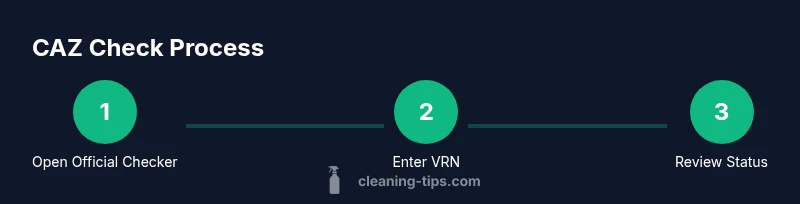
The primary way to verify CAZ status is via official government or local authority tools. Start with your city or region’s transport department website, then navigate to the Clean Air Zone checker page. You’ll typically need your vehicle registration number (VRN) and sometimes the exact travel date. If you drive multiple vehicles, repeat the check for each VRN. Some regions offer mobile apps or downloadable PDFs with zone maps and payment options. Using official sources ensures you receive accurate, up-to-date information and reduces the risk of misinformation from third-party sites.
Understanding the result and what it means for you
After entering your VRN, you’ll see whether your vehicle is currently compliant within the zone. The result may indicate that your vehicle is exempt, charged, or requires an upgrade to meet standards. If a charge applies, you’ll learn the amount, payment window, and how to pay. If you’re exempt, you’ll see the conditions that apply (e.g., vehicle type, disability exemptions, or certain days). Results can also indicate whether an alternative route or mode of transport is recommended. Always verify the date of the check, since zone rules can change over time, and a vehicle that is compliant today may not be tomorrow.
Exemptions, discounts, and how to apply
Exemptions and discounts exist for a range of situations, including disability exemptions, certain vehicle categories (e.g., electric or plug-in hybrids meeting specific criteria), or vehicles with special registrations. To apply for an exemption, follow the official process provided in the CAZ checker or the local council’s guidance. Gather supporting documentation in advance (registration documents, proof of disability, or vehicle emission data) and submit through the official channel. Remember that exemptions are not automatic; failure to complete the correct steps can lead to charges.
Paying charges and alternative routes
If your vehicle is not compliant, you’ll need to consider options such as upgrading your vehicle, purchasing a permit, or using a different route or mode of transport. Payment windows and methods vary; some zones allow online payments, apps, or in-person payments at designated locations. Plan ahead by noting payment deadlines to avoid late fees. If the zone is near but not directly in your usual route, consider traveling outside peak hours or using public transit to reduce costs and emissions.
How to prepare for a zone-aware journey
Preparation starts with a quick checklist: know your VRN, check the zone status for your planned route, confirm any exemptions, and have a plan B. Save the official checker link in your phone, enable notifications for zone updates, and keep a printed or digital copy of the result on hand when you drive in areas with CAZs. Regularly updating your vehicle’s emissions information and staying informed about changes in CAZ boundaries will help you stay compliant and avoid penalties.
Data accuracy and common pitfalls
A common pitfall is relying on non-official sources for CAZ information. Always confirm results with the official checker for your area. Some sites may display outdated or incomplete data, leading to misinterpretation of charges or exemptions. If you’re unsure, contact the local authority for clarification. Another pitfall is failing to re-check before planned trips to urban centers, since zones can change and temporary exemptions may apply. Keeping a habit of verifying status keeps you compliant and avoids unnecessary costs.
Staying updated: how zones evolve
CAZ rules can evolve with urban policy and air quality goals. Cities may expand boundaries, alter category requirements, or adjust charging levels. To stay current, subscribe to official alerts, follow council announcements, and regularly revisit the CAZ checker before long trips into affected areas. Community boards and local news outlets can also be useful, but always cross-check with the official sources.
Printable checklist you can keep in your car
Create a compact, printable checklist you can store in your glove box. Include: the CAZ area you frequent, your VRN, the current zone category for your usual routes, any exemptions applicable to you, and a saved link to the official checker. Before a trip, quickly verify status, review the form of payment if required, and note alternative routes. A physical checklist reduces last-minute delays and helps everyone in the vehicle stay informed.
Real-world scenarios and best-practice examples
Consider a typical weekday when you drive into a city center for work. If your car is diesel and older, you may face a charge unless you qualify for an exemption or upgrade. In contrast, a modern petrol or electric vehicle may pass without issue. For weekend shopping trips with family in a CAZ city, plan routes that minimize exposure to the zone, or use public transit on busy days. The best practice is to check status for each planned trip and to keep your documentation accessible in the car.
Tools & Materials
- Internet-enabled device (phone, tablet, or computer)(Stable connection; bookmark the official CAZ checker URL)
- Vehicle registration number (VRN) for each vehicle you drive regularly(Needed to run checks for each car or van)
- Official CAZ checker link or app(Use only government or local authority sources)
- Notepad or digital notes app(Record results, deadlines, and exemptions)
- Printed or digital copies of exemption criteria(Keep handy in case you qualify for an exemption)
Steps
Estimated time: 15-25 minutes
- 1
Open the official CAZ checker for your area
Navigate to your city or region's transport department site and locate the Clean Air Zone checker page. This is your first step to confirm whether a zone affects your planned route and vehicle. Have your VRN ready to enter the system.
Tip: Bookmark the official page and verify you are on a government site to avoid scams. - 2
Enter your vehicle registration number
Input the VRN for the vehicle you plan to drive. If you use more than one vehicle, repeat the check for each VRN. The checker will pull emission and vehicle data to determine eligibility.
Tip: Double-check the VRN for accuracy to prevent misclassification. - 3
Review the zone status result
Read the displayed status carefully. It will indicate compliant, exempt, or charged. Note any specific conditions or dates for when the status is valid.
Tip: Take a screenshot or save the result for reference during travel. - 4
Check for exemptions or discounts
If you think you may qualify for an exemption or discount, review the criteria and gather any supporting documents. Exemptions are not always automatic and require official validation.
Tip: Prepare documentation in advance to speed up the application if needed. - 5
Note payment requirements if charged
If a charge applies, identify payment windows, accepted methods, and how to pay. Missing deadlines can incur penalties.
Tip: Consider setting calendar reminders a day before the deadline. - 6
Plan alternatives if needed
If your vehicle isn’t compliant or you’re waiting on an exemption, plan an alternative route or transport method to avoid the zone.
Tip: Check multiple route options to compare time, cost, and emissions. - 7
Re-check before future trips
CAZ rules can change; re-check before each long trip into a restricted area. This minimizes surprises and penalties.
Tip: Set up a monthly reminder to review any zone updates in your area. - 8
Document and store results
Keep a record of checks, exemptions, and payment confirmations. This makes audits or disputes easier.
Tip: Organize results by vehicle and by zone for quick retrieval.
Questions & Answers
What is a Clean Air Zone (CAZ) and why does it exist?
A CAZ is a regional measure designed to reduce air pollution by charging certain vehicles to enter specific urban areas. The goal is to encourage cleaner transport and improve air quality. Rules vary by city, so always check the official checker for your area.
A CAZ is a city-specific area with charges on some vehicles to improve air quality. Check your area’s official rules for details.
How do I know if my vehicle needs to pay a charge?
Enter your vehicle registration in the official CAZ checker to see if your vehicle is compliant or if a charge applies. If a charge is due, the checker will display the amount and payment window.
Enter your vehicle registration to see if a charge applies and how to pay.
Are exemptions available for older vehicles or certain drivers?
Yes, exemptions exist for specific vehicle types, disabilities, and sometimes age-related exemptions. Each zone has its own criteria. Apply through the official channel with the required documentation.
Exemptions exist for certain vehicles and circumstances; check the official rules and apply with documentation.
Can I check CAZ status on my phone?
Most official CAZ checkers are mobile-friendly or have apps. You can perform checks from a smartphone, tablet, or computer, ensuring you have the VRN handy.
Yes, you can check CAZ status on your phone using the official checker.
What happens if the CAZ rules change after I’ve checked?
Rules can change with policy updates. Re-check before any future trips into the zone and subscribe to official alerts for timely updates.
Rules can update; re-check before trips and sign up for alerts.
Where do I find the official CAZ checker and payment options?
Use your city or regional transport authority website. Look for the CAZ checker page, zone maps, and payment instructions on the official site.
Find the CAZ checker on the official transport authority site.
If I believe the checker is wrong, what should I do?
Double-check your VRN, revisit the official page, and contact the local authority for clarification or to dispute a result.
If you think the result is wrong, re-check and contact the authority for help.
Watch Video
The Essentials
- Know your zone before you drive.
- Check your VRN against official sources.
- Apply exemptions early when possible.
- Document and save results for proof.
- Re-check status before future trips to evolving zones.