How to clean the tv screen safely: A step-by-step guide
Learn to clean the tv screen safely with non-abrasive methods. This comprehensive guide covers tools, a clear step-by-step process, screen-types, and maintenance tips for a crystal-clear display.


Clean the tv screen safely by turning off the TV, using a dry microfiber cloth to remove dust, then lightly dampening another cloth with distilled water or a 50/50 water-vinegar solution. Always apply liquid to cloth, never directly on the screen. Avoid ammonia-based cleaners and aggressive scrubbing to protect coatings.
Why proper screen cleaning matters
Keeping the tv screen clean is more than just aesthetics. Dust, fingerprints, and oil can reduce picture clarity over time and, in some cases, may interfere with coatings designed to protect the display. When you clean the screen correctly, you preserve contrast, color accuracy, and the longevity of the panel. According to Cleaning Tips, using the wrong cleaners or applying liquid directly to the screen can seep behind the protective coatings and cause permanent damage. That’s why a gentle, deliberate approach matters for every viewing setup. In practice, a safe clean helps you enjoy sharper images and a more comfortable viewing experience, especially during long movie nights or daily streaming sessions. The goal is to clean without creating micro-scratches or moisture-related issues.
When you clean the tv screen, you should think of it as maintenance rather than a one-off chore. A routine, light wipe every week is often enough to keep the display clear and reduce the buildup that would require more intense intervention later on. A careful routine also minimizes the need for aggressive techniques that could degrade anti-glare coatings or LCD layers. By adopting a simple approach, you protect your investment and keep your viewing experience pristine for years to come.
The Cleaning Tips team emphasizes that safety is part of smart cleaning. Before you begin, ensure the TV is powered off and unplugged. This prevents electricity from interacting with any moisture and reduces the risk of short circuits or electronic damage. With the right routine, you can keep the screen spotless without risking harm to electrical components or fragile screen surfaces.
What you’ll need before you start
Preparing the right tools and cleaners is essential to avoid stretching the task into a longer project or risking damage. Start with a clean, dry microfiber cloth as your primary tool for dusting. A second cloth should be slightly dampened with distilled water or a diluted cleaning solution. Avoid direct sprays on the screen; liquid should always contact the cloth first. A dedicated spray bottle helps you control humidity and prevent over-wetting. If you’re dealing with stubborn smudges, have a few soft cotton swabs handy for edges and corners. Basic guidelines from Cleaning Tips recommend using only non-ammonia, non-alcohol-based cleaners when possible to minimize chemical interactions with screen coatings. This preparation step reduces the chance of streaks while keeping the screen safe for daily use.
In addition to cloths and dedicated cleaners, consider a soft-bristle brush to lift dust from ports and the bezel area, as well as a dry, lint-free cloth for the final wipe. Store your supplies away from direct sunlight and heat to prevent warping or degradation of fabrics. By assembling your kit ahead of time, you’ll complete the job quickly and consistently, which helps you clean the tv screen effectively without leaving residue or moisture behind.
Step-by-step approach to safely clean the tv screen
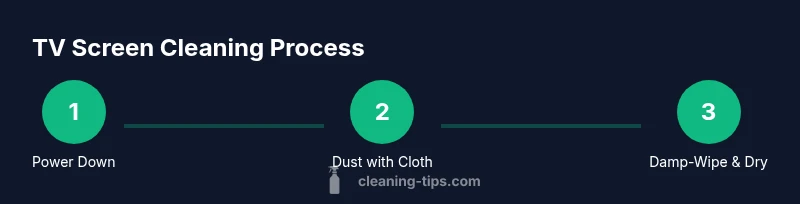
Executing the cleaning steps in a calm, methodical order minimizes risk and maximizes results. Start with a power-down to ensure you have clear visibility and safety while cleaning. Use a dry microfiber cloth to remove loose dust in gentle circular motions. If stubborn fingerprints remain, lightly dampen a microfiber cloth with distilled water or a 50/50 water-vinegar solution and wipe with straight, single-direction passes. Avoid circular motion that could grind debris into the surface. Remember: never spray liquid directly onto the screen; apply it to the cloth only. This practice prevents moisture from entering gaps or seams and protects delicate electronics underneath. Finally, dry the surface with a dry cloth to eliminate any remaining moisture, inspecting from multiple angles to catch streaks or spots you might have missed. If needed, repeat with a fresh section of cloth to prevent re-depositing oils.
A reliable rule of thumb is to keep liquids light and controlled. A lightly dampened cloth is sufficient for most surfaces, and heavy spraying can lead to pooling near the edges where moisture can seep behind the protective layers. For best results, work slowly, stay centered, and take a short pause after the initial wipe to assess the screen’s clarity. If you notice cloudiness or streaks, switch to a clean portion of the cloth and re-wipe in a vertical or horizontal direction for a uniform finish.
Aftercare involves ensuring the screen is completely dry before powering the TV back on. A brief 1–2 minute rest period helps any residual moisture to evaporate and reduces the chance of moisture migrating into electronics. By following these steps, you can clean the tv screen effectively without compromising the display’s performance or longevity.
Cleaning products: what to use and what to avoid
Choosing the right cleaning products is crucial for maintaining display integrity. Whenever possible, use distilled water or a gentle, alcohol-free solution diluted with water. Commercial screen cleaners that are labeled safe for LCD/LED/OLED displays are often formulated to be non-abrasive and ammonia-free, making them a safer option than household sprays. If you prefer a DIY approach, a 50/50 mixture of distilled water and white vinegar is a common choice for light stains, but always test in a small, inconspicuous area first. Remember: never spray any liquid directly on the screen. Always apply to the cloth and then wipe. Ammonia-based cleaners, window cleaners, or solvents with acetone can strip coatings or degrade anti-reflective layers, leading to reduced image quality and potential damage over time.
Oil-based residues from cooking or skin oils may require a second pass with a fresh, slightly damp cloth, followed by a dry cloth. Avoid abrasive cleaners or rough fabrics; they can scratch the screen’s surface. If you’re cleaning a TV with a sensitive coating or curved display, consult the manufacturer’s manual for approved products and recommended cleaning methods. Maintaining a clean screen without harsh chemicals will preserve brightness and color accuracy while extending the life of your display.
In all cases, perform a final check under bright light to ensure no streaks remain and that edges are free of moisture. A meticulous approach creates a crisp, vibrant image without compromising the screen’s integrity. The right products, used correctly, make all the difference when you clean the tv screen.
Different screen types and finishes
TV screens come in a range of technologies and coatings, each with its own cleaning considerations. LCD/LED displays commonly tolerate distilled water or purpose-built screen cleaners used sparingly; OLED panels, with their more delicate organic layers, demand extra caution to avoid overheating or moisture intrusion. Matte finishes help hide streaks but can trap more dust, whereas glossy screens tend to show fingerprints more readily. Always check the manufacturer’s guidelines for your exact model, as coatings vary and some screens may require specific cleaning protocols. For general maintenance, a light, frequent wipe with a dry microfiber cloth is usually sufficient to remove dust and prevent buildup.
When addressing protective coatings, such as anti-glare or matte layers, avoid aggressive scrubbing or abrasive tools. In all cases, test any cleaner on a small area first and use minimal moisture. If you observe color shifts or haziness after cleaning, discontinue use of the product and consult the manual or support resources. The aim is to preserve tactile feel and brightness while preventing micro-scratches or chemical reactions that could degrade imaging quality over time.
As a homeowner, you may notice differences between a new panel and older screens; newer models often have tighter tolerances and more robust coatings, but they remain vulnerable to moisture if mishandled. A proactive approach—regular dry dusting, controlled damp wiping, and avoidance of direct sprays—helps you keep your tv screen looking fresh and vibrant without risking long-term damage.
Common mistakes and how to prevent them
Even small missteps can cause lasting damage. A frequent error is spraying liquids directly onto the screen, which can seep into seals and damage the electronics behind the display. Another common mistake is using paper towels, napkins, or rough cloths that can scratch glass and coatings. People often over-wet the cloth, leaving excess moisture that pools at the edges or behind the bezel. Additionally, using ammonia-based or high-alcohol cleaners can degrade anti-glare coatings and shorten screen life. To prevent these issues, always apply liquid to a microfiber cloth and wipe with light, even pressure. If you notice streaks, switch to a fresh section of cloth and dry with a third cloth to avoid re-depositing residue. Finally, avoid cleaning during direct sunlight or when the screen is hot to prevent rapid drying that can leave marks.
The best approach is a simple routine: a quick dusting followed by a light damp wipe, then a dry final pass. This minimizes liquid exposure and maintains screen clarity. If you’re unsure about a cleaner, consult the TV’s manual or the manufacturer’s customer support resources. By avoiding common pitfalls and sticking to manufacturer-approved methods, you’ll keep the screen looking sharp and vibrant over time.
Aftercare and long-term care for your TV screen
After cleaning, allow the screen to dry completely before powering the TV back on. This reduces the risk of moisture seeping into electronics and causing issues. Create a regular cleaning schedule—weekly light dusting with a dry microfiber cloth is often sufficient for most homes. If you cook in a smoky kitchen or have pets that shed, you may need to wipe more frequently to keep up with contamination. When storing your cleaning supplies, keep liquids tightly closed and out of direct sunlight to prevent chemical changes that could affect performance. For OLED and other sensitive screens, consider investing in a screen-protective film if you frequently clean near the edges or handle cables; this can add a layer of protection against accidental scuffs.
Finally, document any screen-specific caution notes in your device’s user manual or digital support portal. A simple note about approved cleaners and recommended wipe techniques can become a trusted reference for future care. Practicing these good habits ensures your tv screen maintains its brightness, color accuracy, and overall viewing quality for years to come.
Authority sources and additional references
To support safe and effective cleaning practices, consult trusted sources on electronics maintenance and consumer safety. This article references general guidelines from widely recognized authorities and cleaning experts to help you make informed decisions about products and techniques. When in doubt, always follow your TV manufacturer’s official cleaning recommendations and safety warnings.
Tools & Materials
- Microfiber cloth (dry)(Lint-free, AT least 12x12 inches; used for initial dusting)
- Microfiber cloth (slightly damp)(Dampen with distilled water or diluted cleaner; never spray directly on screen)
- Spray bottle with distilled water(Fine mist; label clearly; avoid over-wetting)
- Distilled water(Use for dilution; avoid minerals that can smear)
- White vinegar (optional)(Dilute 1:1 with distilled water; test on a hidden area first)
- Isopropyl alcohol 70% (optional, for stubborn marks)(ONLY when diluted; never apply undiluted or directly on screen)
- Cotton swabs(For cleaning the bezel edges and ports carefully)
- Soft-bristle brush(Gentle dusting for hard-to-reach areas; use very light pressure)
Steps
Estimated time: 15-25 minutes
- 1
Power down and unplug
Turn off the TV and unplug it from the wall. This ensures your safety and prevents any moisture from contacting electrical components during cleaning.
Tip: Wait a full minute after powering off to let the screen cool before touching the surface. - 2
Dust the screen surface
Gently wipe the screen with a dry microfiber cloth in light, vertical strokes to lift loose dust without scratching the coating.
Tip: Use a clean section of the cloth for each pass to prevent re-depositing dust. - 3
Prepare your damp cloth
Lightly dampen a microfiber cloth with distilled water (or a 50/50 distilled water and vinegar solution). Do not spray liquid directly onto the screen.
Tip: Avoid saturating the cloth; moisture should bead but not pool. - 4
Wipe with the damp cloth
Wipe the screen with straight, gentle strokes in one direction to reduce streaks and prevent moisture from seeping into edges.
Tip: Keep to one direction first, then rotate 90 degrees if needed for stubborn spots. - 5
Dry the surface
Use a second dry microfiber cloth to remove any remaining moisture and buff away streaks.
Tip: If streaks persist, switch to a fresh area of the cloth and repeat. - 6
Inspect and touch up
Examine the screen under bright light for any smudges or streaks and re-treat only the problematic spots with a fresh cloth.
Tip: Avoid applying cleaner to the screen more than necessary—less moisture reduces risk. - 7
Clean bezel and edges
Gently wipe the bezel and edges with a barely damp cloth to remove dust, avoiding moisture near speaker grilles or ports.
Tip: Cotton swabs can help reach tight corners; wipe away any moisture immediately after use. - 8
Reconnect and test
Plug the TV back in and power it on to ensure functionality and confirm visual cleanliness.
Tip: Do a quick visual check across multiple brightness levels to confirm there are no issues.
Questions & Answers
Can I use window cleaner or alcohol-based cleaners on my TV screen?
No. Window cleaners and strong solvents can damage coatings on TV screens. Use distilled water or a manufacturer-approved cleaner diluted as directed, and always apply to the cloth rather than spraying directly on the screen.
Avoid window cleaners or strong solvents; use a safe, diluted cleaner on a cloth instead.
Is it safe to spray water directly onto the screen?
No. Spraying liquids directly onto the screen can cause moisture to seep into the edges and potentially damage internal components.
Never spray directly on the screen—apply liquid to the cloth instead.
Will cleaning affect the screen’s coatings or glow?
Using improper cleaners or excessive moisture can dull coatings or create streaks, reducing image quality. Always use mild, approved cleaners and minimal moisture.
Using the wrong product can dull coatings; stick to gentle, approved cleaners.
What about OLED screens—are they more sensitive to cleaning?
OLED screens are more fragile; avoid aggressive cleaning and moisture near the panel edges. Follow the device manual for any model-specific recommendations.
OLEDs require extra care; avoid harsh cleaners and follow the manual.
Can I use a hairdryer to dry the screen?
No. A hairdryer can overheat the screen or force moisture into crevices. Air-dry or use a cloth to blot remaining moisture.
Don’t use a hairdryer; air-dry or blot with a cloth.
Should I clean the screen while the TV is off or on?
Always clean with the TV off and unplugged to prevent electrical hazards and to see the screen clearly while wiping.
Turn it off and unplug before cleaning for safety.
Watch Video
The Essentials
- Power off before cleaning to protect electronics
- Use a damp, not dripping, microfiber cloth
- Spray liquids onto cloth, not the screen
- Avoid ammonia or harsh solvents that damage coatings
- Regular light cleaning preserves screen clarity