How to Clean an iPad Screen Safely: Step-by-Step Guide
Learn how to safely clean your iPad screen with a microfiber cloth and gentle, screen-safe liquids. This step-by-step guide covers prep, technique, and common mistakes to avoid.


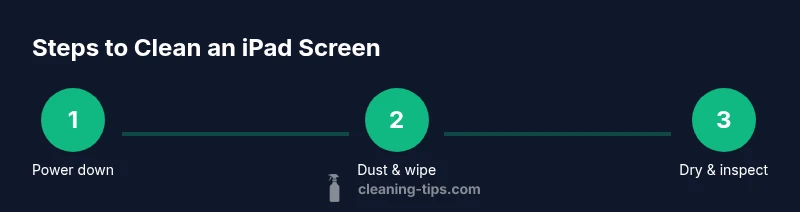
Power off the iPad, remove the case, and wipe the screen with a soft microfiber cloth. Lightly dampen the cloth with distilled water or a screen-safe cleaner; never spray liquids directly onto the glass. Wipe in gentle circular motions, then dry with a clean section of the cloth. Avoid ammonia or alcohol-based cleaners and excessive pressure on the edges.
Why screen care matters for iPad longevity and clarity
Regular screen maintenance is more than cosmetic; it helps you see the display clearly, reduces streaks, and can extend the device’s usable life. The Cleaning Tips team notes that daily or weekly quick cleans prevent dust buildup that can scratch the glass over time. Keeping the surface free from oils and fingerprint residue improves touch accuracy and reduces glare in bright rooms. In practice, a simple routine—gentle wipes with a microfiber cloth and occasional minor dampening—delivers noticeable benefits. For homeowners and renters alike, this is a small habit with a big payoff in daily usability and overall device health.
- Start with the least invasive method: a dry microfiber wipe to lift loose dust.
- If smudges persist, move to a slightly damp cloth, never apply liquid directly to the screen.
- Avoid harsh cleaners and abrasive materials that can scratch or discolor the display.
The guidance here aligns with Cleaning Tips’ general recommendations for electronics care: use non-abrasive tools and screen-safe liquids, and always prioritize device safety over a perfect shine.
bolded content for accessibility not required here],
Tools & Materials
- Microfiber cloth(Lint-free; avoid paper towels that can scratch the surface.)
- Distilled water(Use sparingly; dampen cloth, never spray on screen.)
- Screen-safe cleaner (optional)(Alcohol-free spray designed for screens; use only on cloth.)
- Soft brush or air blower (optional)(Gently remove dust from edges and corners.)
- Cotton swabs (optional)(Only dampen slightly for tight spots; avoid dripping liquid.)
Steps
Estimated time: 5-10 minutes
- 1
Power down and prep
Power off the iPad completely and remove its case if possible. This reduces the risk of shorting electronics and keeps the edges clean during cleaning. If you have a smart cover, open it and place the device on a clean, dry surface.
Tip: Powering down prevents moisture from accidentally contacting internal components. - 2
Dust removal
Gently brush or wave a soft brush over the screen to lift loose dust and particles. You can also use a blast of air from a blower to clear debris from the corners. Avoid rubbing dust into the screen as it can create micro-scratches.
Tip: Dust removal first makes the subsequent wipe more effective. - 3
Prepare the cleaning cloth
Moisten a corner of your microfiber cloth with a small amount of distilled water or a screen-safe cleaner. Wring it out well so it is just damp. Never pour liquid directly onto the screen or let liquid pool on the surface.
Tip: The cloth should feel barely damp to prevent moisture seepage. - 4
Wipe in gentle circles
Begin at the center of the screen and move outward in small circles. Apply light pressure and let the moisture do the work. If you notice streaks, switch to a dry section of the cloth and buff.
Tip: Avoid pressing on the edges where water can seep into openings. - 5
Dry and inspect
Use a dry part of the cloth to dry the screen and check for remaining smudges. If needed, repeat the dampen-and-wipe step with a fresh cloth area. Ensure the screen is dry before reattaching the case.
Tip: A dry, clean surface prevents re-soiling and streaks. - 6
Reassemble and test
Reinsert the case or cover and power the device back on. Check for smooth touch response and ensure no moisture remains around the ports or speaker grills.
Tip: If you notice moisture near openings, power down again and air out before using.
Questions & Answers
Can I use alcohol to clean my iPad screen?
Alcohol can remove coatings and cause streaks; avoid it. Use distilled water or a screen-safe cleaner on a microfiber cloth and never spray directly on the screen.
Alcohol is not recommended for iPad screens. Use water or a screen-safe cleaner on a microfiber cloth.
What if liquid gets into the ports?
Power the device off and do not turn it on until completely dry. Gently tilt to help moisture escape and use a dry cloth to wipe around openings.
If liquid gets near openings, power off and dry thoroughly before using again.
How often should I clean the screen?
Clean as needed when you notice fingerprints, smudges, or dust that affects visibility. Regular light cleaning is sufficient for most devices.
Clean when you see smudges or dust; a light wipe weekly can prevent buildup.
Can I use a paper towel or regular cloth?
Avoid paper towels or rough fabrics that can scratch the screen. Use a clean microfiber cloth for best results.
Don't use paper towels; microfiber cloths are best for iPad screens.
Is it safe to use a spray cleaner on the screen?
Only spray cleaners on the cloth, not directly on the screen. Choose alcohol-free, screen-safe products.
Spray cleaner on the cloth, not on the screen, and use a product designed for screens.
Watch Video
The Essentials
- Power off before cleaning
- Use a barely damp microfiber cloth
- Never spray liquids on the screen
- Clean in gentle circles from center outward
- Recheck for streaks and moisture before use