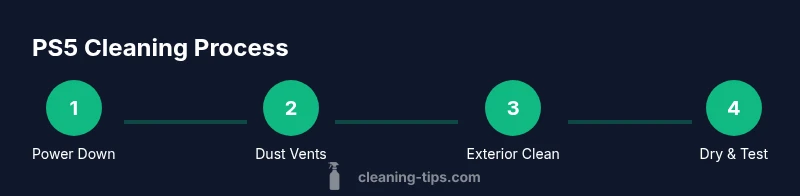
How to Clean PS5: Safe Cleaning Guide
Learn how to clean PS5 safely with step-by-step instructions, dust removal, exterior care, and maintenance tips to keep your console cool and quiet.


To clean ps5 safely, unplug the console, power it down, and remove any accessories. This guide covers dust removal, exterior cleaning, and care for ports and vents. You will learn practical, appliance-safe methods, plus what to avoid to protect internal components. According to Cleaning Tips, safe maintenance starts with a dry clean and careful brushing before any damp cleaning.
Why Regular Cleaning Matters for PS5
Dust and debris can accumulate inside and around the PS5’s vents, reducing airflow and causing the system to run hotter. Over time, heat buildup can affect fan performance, increase system noise, and shorten the console’s lifespan. Regular cleaning helps maintain good airflow, which in turn supports consistent performance during long gaming sessions. The Cleaning Tips team notes that addressing dust early minimizes thermal throttling and the need for sudden pauses during gameplay. Even small accumulations on the top vents can disrupt air intake, so a quick, periodic wipe makes a real difference. For best results, combine dry dusting with targeted brushing to loosen stubborn debris. Keep in mind: frequent, gentle cleaning is easier than deep, once-in-a-while scrubbing. By building a routine, you’ll prevent softer components from being strained and preserve the PS5’s cooling efficiency for years to come.
Safety First: What Not to Do When Cleaning
Safety must come first when cleaning electronics. Always unplug the PS5 from the power source and allow it to cool before handling. Never spray liquids directly onto the console or into vents, and avoid using a vacuum or any high-suction tool near openings, which can damage delicate components. Do not open the chassis or remove internal covers; only exterior surfaces should be cleaned. Keep liquids away from controllers, cables, and the power supply to prevent short circuits. If you’re unsure about a method, stop and consult the manufacturer’s guidance. According to Cleaning Tips, following these precautions helps prevent costly damage and preserves warranty terms where applicable.
Pre-Cleaning Prep: Create the Right Environment
Before you start, choose a clean, well-lit workspace away from dust and moisture. Gather your tools and materials, and establish a dry-cleaning zone so you don’t contaminate the console with residue from other tasks. Clear nearby surfaces and lay down a soft mat to protect PS5 if you need to set it down. To protect your screens and discs, remove any media and detach controllers. If you use compressed air, read the can’s instructions and perform a test puff away from the unit first. A gentle, patient approach reduces the risk of accident and ensures you can spot dust pockets more easily.
Dust Removal: Vents, Fans, and Airflow Paths
Target the main intake and exhaust areas first. Use short bursts of compressed air to dislodge dust from the side vents and the rear grill, keeping the can upright and at a safe distance (about 6-8 inches). Slightly angled bursts help dust escape rather than push it deeper inside. After blasting, use a soft brush or microfiber cloth to sweep away loosened debris. Do not touch the fan blades directly; they are delicate and can be damaged if forced. If you hear grinding or see excessive dust accumulation, pause and re-check your approach. Let the console rest for a moment before testing cooling performance.
Exterior Cleaning: Surfaces, Buttons, and Disc Drive
Wipe the exterior with a microfiber cloth lightly dampened with isopropyl alcohol (70%), focusing on flat surfaces around the logo, power button, and disc drive insert. Avoid scrubbing plastic surfaces aggressively; soft circular motions are enough to remove smudges. For stubborn grime near button grooves, use a cotton swab lightly moistened with cleaning solution and twist to lift residue. Finally, dry all surfaces with a clean microfiber cloth to restore the console’s finish and prevent streaks. Do not spray cleaner into the disc drive or any ports. Let any moisture evaporate completely before reconnecting power.
Ports and Cables: Safe Cleaning Practices
Ports like HDMI, USB, and power are highly sensitive. Use a dry cotton swab to remove dust from port openings; never drip liquid into ports and never insert objects that could bend pins. If needed, a lightly dampened swab with alcohol can be used sparingly on outer connector surfaces, then wiped dry. Route cables cleanly to avoid strain on connectors; keep power and HDMI cables separated to reduce interference during gameplay. Finally, inspect the controller area and where the console sits on the shelf to ensure there’s no obstruction to airflow.
Post-Cleaning Care: Drying, Testing, and Maintenance
Give the PS5 a moment to dry completely before plugging back in and powering on. Reassemble accessories and media, then power up and monitor for unusual fan noise or heat. If temperatures rise, power down and re-check the vents for remaining dust. Establish a simple maintenance routine—quick cleanups every few weeks or after long gaming sessions, depending on your environment. Cleaning Tips suggests keeping a dedicated cleaning routine to extend the console’s life and sustain cooling performance.
Common Mistakes and Quick Fixes
Common errors include over-wetting cloths, spraying liquids directly onto the unit, or using a vacuum to clean vents. Moisture can seep into internal circuitry and cause corrosion or shorts. When dust is stubborn, pause and retry with shorter bursts of compressed air, keeping the can upright. If you encounter resistance or unusual noises, stop cleaning and consult a professional to avoid damaging sensitive parts.
Tools & Materials
- Microfiber cloth (dry)(Lint-free, non-abrasive; use for dusting and drying)
- Soft-bristle brush(Gentle brushing for vents and crevices)
- Compressed air can(Short bursts, hold upright, 6-8 inches away)
- Cotton swabs (Q-tips)(For port crevices; dampen slightly if needed)
- Isopropyl alcohol 70%(Dampen cloth sparingly; avoid direct liquids on ports)
- Drying towel(Optional second microfiber for final dry)
- Anti-static wrist strap (optional)(If you handle interior components; not necessary for exterior cleaning)
Steps
Estimated time: 15-25 minutes
- 1
Power down and unplug
Turn off the PS5, wait for the power indicator to stop, and unplug the power cable. This protects you from shocks and prevents electrical short circuits during cleaning.
Tip: Never pull by the cord; grip the plug to disconnect. - 2
Set up your workspace
Prepare a clean, well-lit surface with a soft mat to cushion the console. Gather all tools and place them within reach to minimize movement during cleaning.
Tip: Work in a dust-free room and keep liquids away from the area. - 3
Dust vents with compressed air
Hold the can upright and use short bursts to dislodge dust from vents and grills. Keep the can 6-8 inches away and avoid moving air directly into the system.
Tip: Let the unit rest briefly after bursts to settle any loosened debris. - 4
Wipe exterior surfaces
Gently wipe the outer shell with a dry microfiber cloth. If needed, dampen the cloth slightly with isopropyl alcohol and wipe, using small circular motions.
Tip: Do not saturate the cloth; moisture can seep into seams. - 5
Clean ports and controller areas
Use a dry cotton swab to remove dust from port openings. If necessary, lightly dampen the swab with alcohol on the exterior surfaces and wipe dry.
Tip: Never drip liquid directly into any port. - 6
Dry, test, and reconnect
Ensure all surfaces are dry before plugging back in. Reconnect accessories and power, then monitor for normal startup and cooling fan behavior.
Tip: If you notice abnormal heat or noise, power down and reinspect vents.
Questions & Answers
How often should I clean my PS5?
Dust buildup depends on environment. Clean every 3-6 months, or sooner if you notice reduced airflow, louder fans, or warmth during play.
Clean every few months, or sooner if you notice dust or overheating.
Can I use water to wipe the PS5?
Do not apply water directly to the PS5. Use a barely damp microfiber cloth and avoid moisture near vents and ports.
No water on the console; use a damp cloth with minimal moisture.
Is it safe to use isopropyl alcohol on PS5 surfaces?
Yes for exterior surfaces in small amounts; avoid ports and screens, and ensure it dries completely before use.
Only on exterior surfaces; avoid ports and let it dry fully.
Can I vacuum the PS5 vents?
Vacuuming can damage components through static and blade damage. Use compressed air and brushing instead.
Avoid vacuuming vents; use compressed air.
Will cleaning void my warranty?
Exterior cleaning and routine maintenance are generally acceptable; disassembly can void warranty. Always follow official guidance.
Check your warranty terms and avoid disassembly.
What if I spill liquid on the PS5?
Power down immediately, unplug, and allow the unit to dry completely before attempting to power on again.
If liquid spills, unplug and dry completely before reuse.
Watch Video
The Essentials
- Unplug before you clean PS5.
- Use dry methods first to minimize moisture.
- Avoid liquids near ports and discs.
- Establish a simple maintenance routine.