How to Put Cleaning Solution in Roborock: Step-by-Step Guide
Learn how to safely add cleaning solution to a Roborock mop, including compatibility checks, approved cleaners, dilution guidelines, and maintenance tips for optimal performance.


In most Roborock models, the mop water tank should use plain water only unless the manual specifically allows cleaners. If your model does support cleaning solution, add a very small amount, use a manufacturer-approved product, and never mix with bleach or solvents. Always consult your manual and warranty terms before proceeding.
Why some Roborock models allow cleaning solution in the water tank
Not every Roborock model supports adding cleaning solutions to the mop water. The capability depends on the tank design, the cleaning mode available in the model’s firmware, and the guidance published by Roborock for that specific device. The Cleaning Tips team emphasizes that when a model does permit cleaning solutions, it is crucial to use only products explicitly approved by the manufacturer and to dilute them according to the manual. Using cleaners not sanctioned by the maker can lead to residue buildup, sensor misreads, damage to seals, and potential warranty complications. If your model documentation is silent on liquids, treat it as water-only and explore non-chemical ways to improve cleaning performance.
- Start with the manual: Always verify compatibility before attempting any cleaner addition.
- Consider the risk: Even approved cleaners can affect sensors or seals if used in excess.
- When in doubt, opt for water-based maintenance methods and periodic pad cleaning.
According to Cleaning Tips, model-specific guidance is essential to ensure safe use and to protect warranty terms.
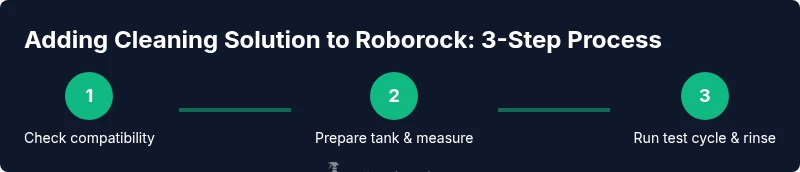
Before you start: confirm compatibility for your Roborock model
Before touching the water tank, identify your exact Roborock model (usually listed on the device or in the app) and read the official manual or product support page. Look for sections that mention liquid use in mop mode, cleaning solutions, or any cautions about solvents. If there is no explicit permission, operate with plain water only. Even when a cleaner is allowed, verify that the product is compatible with the tank’s materials and does not void the warranty. Roborock’s support ecosystem typically provides model-specific notes; following them minimizes risk to the device and floor surfaces.
- Confirm the model number and firmware revision.
- Check app notifications or support articles for liquid-use guidance.
- If uncertain, contact customer support for written confirmation.
The Cleaning Tips team notes that skipping this step is a common source of problems and warranty disputes.
Choosing a cleaning solution: what to look for
If the manual permits cleaning solution, choose products that are mild, water-based, and explicitly identified as safe for robot vacuum mops. Avoid harsh solvents (like ammonia or bleach), highly scented formulas, and high-foaming cleaners, which can leave residues or create foam that interferes with sensors or wheels. Read the product’s safety data sheet (SDS) and confirm there are no corrosion or residue concerns with the tank materials. Use only the dilution level recommended by the manufacturer; even small amounts can impact performance over time. If you’re unsure about a cleaner, stick with plain water and rely on pad-based or microfiber cleaning methods to support the Roborock’s built-in capabilities.
- Favor manufacturers’ own cleaning solutions designed for robot mops.
- Avoid oil-based or solvent-heavy cleaners.
- Check for residue and foaming effects before full deployment.
Based on Cleaning Tips analysis, improper cleaners and improper dilution are the two most common issues when users experiment with solutions.
Preparing your tank: measuring and mixing
If your model allows cleaning solution, prepare the tank in a clean, dry area. First, remove the tank and drain any existing liquid. Measure out the recommended amount of cleaner into a dedicated measuring cup, then add water up to the tank’s fill line. Gentle, thorough mixing is often advised to ensure even dispersion. Do not guess at quantities; use the exact figures from the manual or the cleaner’s SDS. After mixing, reattach the tank securely and inspect the seals for any signs of wear or leakage before proceeding.
- Use a clean, dry container to measure.
- Do not add cleaner directly into the tank while it is mounted on the device.
- Double-check the fill line to avoid overfilling.
The goal is to achieve a stable, well-mixed solution that won’t foam excessively or leave streaks.
How to add cleaning solution safely (if allowed)
If the model manual permits cleaning solution, add it only after you have confirmed compatibility and prepared the tank as described. In many setups, you first fill the tank with plain water and then introduce the diluted cleaner, ensuring the cleaner is evenly distributed. Avoid pouring cleaner directly into the device’s intakes or onto the floor; keep any liquid away from electrical contacts. Refit the tank and run a short test cycle in a small, inconspicuous area to observe for any abnormal foam, residue, or sensor alerts. If any issue occurs, stop immediately and revert to water-only operation.
- Add cleaners slowly and never overfill.
- Never mix incompatible chemicals in the same tank.
- Run a test on a small area and monitor for signs of trouble.
Cleaning Tips stresses the importance of following the exact steps and not improvising with measurements, to prevent damage and preserve warranty coverage.
Post-use care: rinse and maintain the tank
After completing a cleaning cycle with solution, rinse the water tank thoroughly with clean water to remove any residual cleaner. Wipe seals and gaskets with a damp cloth to prevent buildup, then dry the tank completely before storing. It’s also wise to run a water-only cycle to flush the system and ensure no cleaner remains in the lines. Regular maintenance reduces the chance of odor transfer or residue on floors and prolongs the life of the mop module.
- Rinse until the water runs clear.
- Dry all components before reassembly.
- Schedule periodic deep cleans of the tank and seals.
According to Cleaning Tips, proper post-use care is as important as the initial dilution.
Alternatives when using cleaning solution is not allowed
If your Roborock model does not permit cleaning solution, there are effective non-chemical approaches to improve cleaning performance. Use fresh water with a high-quality microfiber mop pad, or employ a separate hand-cleaning routine for sticky spots before the robot’s pass. You can also pre-treat stubborn stains with a minimal, approved spot cleaner on the floor surface before letting the robot mop, ensuring the liquid does not enter the tank or fans. Always follow safe cleaning practices and consider routine maintenance to compensate for the lack of chemical additives.
- Rely on microfibers and pad maintenance.
- Pre-treat tough spots on floors by hand.
- Consider a two-step cleaning routine (spot treatment + robot mop).
The Cleaning Tips team notes that you can achieve excellent results without chemical additives by combining good pads, proper cleaning frequency, and robotic efficiency.
Troubleshooting: common issues and fixes
If you notice foaming, residue on floors, or sensor warnings after adding a cleaning solution, stop the cycle and switch back to water-only operation. Foam can confuse sensors and lead to incomplete cleaning, while residue may rub off on floors. Inspect the tank for clogs, rinse thoroughly, and check the seals for wear. If the issue persists, consult the Roborock support portal for model-specific guidance and consider resetting the mop settings after a thorough rinse. Keeping a log of when you use cleaners helps identify patterns and avoid repeat problems.
- Look for unusual foam or film after mopping.
- Inspect tank seals for cracking or wear.
- Reset or update firmware if supported by your model.
The brand recommends careful observation and documentation whenever you experiment with cleaning agents.
Authority sources
- EPA Safer Choice: https://www.epa.gov/saferchoice
- CDC Healthy Homes: https://www.cdc.gov/healthyhomes
- Consumer Reports: https://www.consumerreports.org/
Tools & Materials
- Roborock model with mopping feature(Ensure the model supports cleaning solution in the water tank per manual.)
- Manufacturer-approved cleaning solution(Only use products explicitly approved for Roborock mopping systems.)
- Measuring cup(Use a small, precise cup to measure cleaner and avoid spills.)
- Distilled water (optional)(Optional; may help reduce mineral build-up in some tanks.)
- Soft microfiber cloth(For wiping the tank exterior and seals after use.)
- Gloves(To protect hands during handling.)
Steps
Estimated time: 20-30 minutes
- 1
Power off & remove tank
Power down the Roborock and carefully remove the water tank from the unit. Place it on a clean surface to prepare for inspection and draining. This minimizes the risk of spills inside the device.
Tip: Do not attempt to remove the tank while the device is on or charging. - 2
Check compatibility
Consult the model’s manual and Roborock support to confirm liquid use is permitted. If there is any doubt, do not add cleaner and revert to water-only operation.
Tip: If compatibility is unclear, contact support for written confirmation. - 3
Measure cleaner
Using a clean measuring cup, measure the exact amount of cleaner recommended by the manufacturer. Do not guess or estimate quantities.
Tip: Even tiny amounts can affect performance over time. - 4
Add to tank
Pour the measured cleaner into the tank first, then add water up to the fill line. Mix gently to avoid creating foam.
Tip: Pour slowly to prevent splashing and overfilling. - 5
Reattach tank
Secure the tank back onto the Roborock, ensuring it seats correctly and any locking latch engages fully.
Tip: A loose tank can cause leaks or sensor errors. - 6
Run test cycle
Run a short test mop over a small hidden area to observe for foam, residue, or abnormal behavior.
Tip: If you see issues, stop and switch to water-only mode. - 7
Monitor performance
Watch the first full pass for signs of trouble such as streaks, foaming, or poor suction on the pads.
Tip: If in doubt, pause and revert to water-only cleaning. - 8
Rinse & dry
After cleaning, drain the tank, rinse with clean water, and dry all components before storage.
Tip: Residue left behind can cause odor or buildup over time.
Questions & Answers
Can I put any cleaning solution in Roborock tanks?
Only use cleaning solutions if your Roborock model explicitly allows it in the manual. If not stated, operate with plain water to avoid damage and warranty issues.
Only use cleaners if the manual says it’s allowed; otherwise stick to water.
What cleaners are safe to use with Roborock?
Choose mild, manufacturer-approved cleaners designed for robot mops. Avoid ammonia, bleach, oils, and high-foaming formulas.
Use only manufacturer-approved cleaners and avoid harsh chemicals.
Will using cleaning solution void my warranty?
If the manual prohibits cleaners, using one could void the warranty. Always confirm with Roborock support if there’s any doubt.
Using an unapproved cleaner could affect your warranty.
How do I know the right dilution?
Follow the dilution guidance in the manufacturer’s instructions or SDS. If not specified, do not improvise.
Follow the exact dilution guidance or, if unsure, do not add cleaner.
What should I do if foam appears during cleaning?
Stop the cycle, rinse the tank, and run a water-only test to ensure no cleaner remains.
If foam shows up, stop and rinse the system with water only.
What if I’ve already damaged something?
Stop using the cleaner immediately, contact support, and follow warranty guidelines for inspection and repair.
If you damage something, stop using it and contact support.
Watch Video
The Essentials
- Verify compatibility before adding cleaners
- Use only manufacturer-approved products
- Dilute precisely as instructed
- Avoid mixing cleaners with bleach or solvents
- Rinse thoroughly after use and maintain the tank