What Clean Phone With: Safe Ways to Sanitize Your Device
Learn what clean phone with safe, proven methods to sanitize your device without damaging the screen or coatings. Practical steps, tools, and safety tips for homeowners and renters.


You will learn how to safely clean a phone using alcohol-based wipes and a damp microfiber cloth without damaging the screen or coatings. This guide covers essential materials, step-by-step actions, and safety tips to minimize moisture near ports. We emphasize testing a small area, never spraying directly, and allowing air-drying before reuse.
Why You Should Clean a Phone with Care
According to Cleaning Tips, understanding what clean phone with the right materials can prevent screen damage and reduce germs without compromising coatings or the phone’s resilience. Modern smartphones feature oleophobic coatings, moisture-sensitive sensors, and tiny gaps around speakers and ports. Cleaning too aggressively or with the wrong liquids can strip coatings or seep into internal components. A careful routine protects not only your device but also your health, especially in households where phones are shared or frequently handled in kitchen and bathroom spaces. By choosing approved cleaners and applying them with a damp microfiber cloth, you can sanitize effectively while preserving screen clarity, touch response, and the device’s long-term performance. This approach aligns with general best practices from Cleaning Tips and other reputable sources that emphasize safe, minimal-moisture techniques.
Key concepts to remember include: avoid direct spray on the phone, use a damp cloth, target the screen first, and keep liquids away from openings. If your phone has a screen protector or case, clean those separately to prevent transfer of moisture to the phone itself. Establish a routine that fits your usage patterns—daily for high-traffic devices, or weekly for personal devices—to maintain both hygiene and device integrity.
Safe Cleaning Agents for Phones
Choosing the right cleaning agents is crucial. The consensus from industry guidelines and Cleaning Tips Analysis suggests that alcohol-based solutions—typically ethanol or isopropyl alcohol at a moderate concentration—are effective for disinfection and safe for most handset surfaces when used correctly. Direct application to ports or speakers must be avoided. Ammonia-based cleaners, bleach, or harsh solvents can damage coatings and seals. If you prefer ready-made products, look for wipes or sprays labeled as safe for electronics and with at least a 60–70% alcohol content. Some devices can tolerate small amounts of water when it is introduced via a damp cloth rather than a spray, but never submerge or soak the device. For sensitive coatings, a gentler wipe paired with a microfiber cloth is a prudent starting point. Cleaning Tips recommends testing any cleaner on a small, inconspicuous area first and stopping if you notice any discoloration or residue.
In practice, you’ll find alcohol-based cleaners are versatile for surfaces, but you should avoid using them on leather cases in direct contact with the phone. If you use sanitizing sprays, ensure they are electronics-safe and leave surfaces to air-dry fully before reassembly.
Tools and Surfaces to Use
Not all cloths are created equal when cleaning electronics. The essential toolkit includes a lint-free microfiber cloth, a small amount of isopropyl alcohol (or an equivalent alcohol-based solution), distilled water for dilution if needed, a spray bottle for controlled moisture, and cotton swabs for tight spaces. A soft, clean surface helps prevent scratching. Work over a non-slip mat to keep the phone stable and to catch any stray droplets. Avoid paper towels and abrasive wipes that can leave fibers or micro-scratches on the screen. Always use a separate cloth for the screen and the back to prevent cross-contamination of oils and residues. If your phone is in a case, remove it to access the exterior more easily, then reassemble after drying.
How to Prepare Your Device Before Cleaning
Preparation is as important as the cleaning itself. Start by powering off the device and unplugging any charging cables. Remove the protective case and, if possible, take out SIM trays or microSD cards per the manufacturer’s guidance. Inspect the device for any visible moisture or condensation; if you see moisture around speakers or jacks, postpone cleaning and allow extra drying time. Place the phone on a dry, lint-free surface and position it to minimize liquid exposure to openings. If you plan to use a diluted cleaning solution, prepare a small container with a tiny amount of alcohol blended with distilled water; never pour liquid directly onto the device. The goal is to create a light, evenly dampened cloth that can lift oils, fingerprints, and germs without saturating the device.
Step-by-Step Cleaning Overview
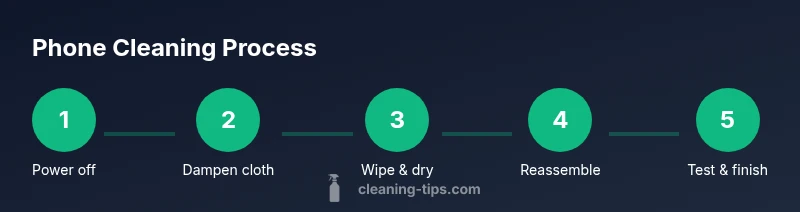
A methodical routine keeps every area of the device clean while reducing risk. First, wipe the flat surfaces with the damp microfiber cloth using gentle circular motions, moving from the center of the screen outward to avoid pushing dirt into the edges. Next, tackle the edges and back with the same technique, being careful around the camera lens and fingerprint sensors. For ports and speaker grills, use a dry cotton swab or a slightly damp swab to lift debris without forcing moisture inside. Finally, dry all surfaces with a clean, dry microfiber cloth and let the device air-dry for a minute before powering back on or reassembling a case. This approach minimizes moisture exposure and protects sensitive components.
Common Mistakes and How to Avoid Them
Many issues arise from over-wetting, spraying directly, or using household cleaners not intended for electronics. Avoid direct sprays on the phone; always apply liquid to the cloth first. Do not use bleach, ammonia, or acetone-based cleaners, as they can erode coatings and seals. Be cautious around ports—noise canceling mics, speakers, and charging docks are moisture-sensitive. If you notice any moisture near the SIM tray or charging port, pause and dry thoroughly before reuse. Always test cleaners on a small area first, and if the coating starts to look cloudy or discolored, discontinue use.
How to Dry and Reassemble
After cleaning, ensure every surface is free of moisture. Use a dry microfiber cloth to remove any residual dampness and let the phone rest on a dry, non-condensing surface for at least one minute. Reattach the case and any accessories only after you’ve confirmed the device is completely dry. If you used a solution near the camera or sensors, avoid direct exposure for a longer period to prevent fogging or residue that could affect image quality. When in doubt, allow it to air-dry a bit longer in a well-ventilated area.
Cleaning Frequency and Best Practices
How often you clean your phone depends on usage and environment. In households with frequent kitchen or bathroom use, a weekly to biweekly routine helps reduce germs and fingerprint buildup. In low-traffic environments, a monthly check-in may suffice. Always adjust based on your concerns (germs, allergies, or shared devices). Use a consistent technique so you don’t risk moisture accumulation in ports or seals. If you share devices, consider wiping down with a sanitizing wipe at the end of the day to maintain hygiene without over-saturating components.
Quick Troubleshooting and Safety Checks
If you notice faint discoloration, a persistent odor, or fogging on the screen after cleaning, stop and recheck your technique. Residue from cleaners or excess moisture can degrade touch sensitivity or screen clarity. If you accidentally get moisture into ports, power off and let the device dry in a warm, ventilated area—never use heat to speed up drying. For devices with advanced coatings, avoid aggressive rubbing and switch to a lighter touch. Regularly inspect for signs of moisture or condensation inside the case and consult the manufacturer’s guidelines if you observe abnormal behavior after cleaning.
Tools & Materials
- Lint-free microfiber cloth(At least two pieces; one for screen, one for back)
- Isopropyl alcohol (70% typical)(Or an electronics-safe alcohol-based cleaner)
- Distilled water(For dilution if needed)
- Spray bottle(Keep to apply a measured amount to the cloth)
- Cotton swabs (Q-tips)(For tight spaces and speaker grills)
- Soft, clean surface(Non-slip mat or tray)
Steps
Estimated time: 8-12 minutes
- 1
Power off and remove case
Power down the device completely and unplug any cables. Remove the protective case and, if possible, any removable accessories to expose all exterior surfaces. This reduces risk of short circuits and makes it easier to reach every area.
Tip: Hold the device gently and avoid forcing openings; it helps to work over a clean, dry surface. - 2
Prepare cleaning solution on cloth
Mix a small amount of alcohol with distilled water if you’re diluting, or use a ready electronics-safe wipe. Lightly dampen the microfiber cloth—never spray liquid directly onto the phone. Wring out the cloth so there is no dripping liquid. This ensures you lift oils without saturating edges.
Tip: Test the damp cloth on a discreet area first to check for color change or streaking. - 3
Wipe screen and back surfaces
Gently wipe the screen with broad, circular motions from the center outward. Then repeat on the back and sides, always using a dry area of the cloth for the final pass to remove any moisture. Avoid pressing into ports or speakers.
Tip: Use long, even strokes to minimize streaks and avoid missed spots. - 4
Clean ports and speaker grills
Use a cotton swab lightly dampened with alcohol solution to lift debris from port openings and speaker grills. Do not insert the swab deeply into openings. If you see lint on the cloth after this step, switch to a fresh piece of cloth.
Tip: Be extra careful around the USB-C/Lightning port and speaker openings. - 5
Dry all surfaces
Wipe all exterior surfaces again with a dry microfiber cloth to ensure there’s no moisture left. Leave the device on a dry surface for a minute or two to air-dry any residual dampness before reassembling.
Tip: Keep the device away from direct heat sources while drying. - 6
Reassemble and power on
Reattach the case and any accessories only after the device is fully dry. Power on and test the screen responsiveness and speakers to verify no moisture remains and that coatings are intact.
Tip: If you notice lag or screen issues, power down and recheck for moisture.
Questions & Answers
Is it safe to clean a phone with water?
Water should not be sprayed directly on the device. If used, water must be in very small amounts via a damp cloth. Alcohol-based solutions are generally safer and more effective for disinfection when applied to the cloth.
Water should not be sprayed on the device; use a damp cloth with minimal liquid for safety.
Can I use hydrogen peroxide or bleach on my phone?
Bleach and hydrogen peroxide can damage coatings and seals. Stick to electronics-safe alcohol-based cleaners and avoid bleach altogether.
Avoid bleach or strong chemicals; use electronics-safe cleaners instead.
How often should I disinfect my phone?
Disinfect when practical, especially if the device is shared or used in high-touch areas. A weekly or biweekly routine works for many households, with adjustments based on usage.
Clean regularly, at least weekly, or more often if shared or high-touch.
Is it safe to use disinfecting wipes on phones?
Electronics-safe wipes can be used, ensuring you don’t saturate openings. Always follow the product’s instructions and avoid the camera lens with excessive moisture.
Use electronics-safe wipes sparingly and avoid moisture near openings.
Should I clean a phone with a protective screen or case on?
Remove the case to clean the phone thoroughly and to avoid trapping moisture. Clean the case separately and ensure both are dry before reassembly.
Take the case off, clean both separately, then dry completely before using again.
What about coatings or screen protectors?
Most coatings tolerate mild alcohol solutions when used carefully. If you notice clouding or residue, switch to a gentler approach and consult the device manufacturer’s guidelines.
Coatings usually tolerate mild cleaners; avoid aggressive scrubbing if you see clouding.
Watch Video
The Essentials
- Power down before cleaning to avoid shorts
- Use a damp cloth, not direct liquid on the phone
- Avoid ammonia and bleach-based cleaners
- Dry thoroughly before reassembly
- Test a small area first to prevent damage