Should You Clean 02 Sensor? O2 Sensor Maintenance Tips
Explore why cleaning a 02 sensor is rarely advised, how to diagnose sensor issues with an OBD-II scanner, and safer alternatives like replacement. A practical guide from Cleaning Tips.


In most cases, you should not attempt to clean a 02 sensor. Cleaning is rarely effective and can damage the sensor or catalytic converter. Instead, diagnose with an OBD-II scanner, inspect wiring and connectors, and replace the sensor if readings remain off.
Why Cleaning a 02 Sensor Is Often Not Recommended
According to Cleaning Tips, tackling a faulty 02 sensor often isn’t the right move. The sensor’s ceramic element and protective coatings are sensitive, and harsh solvents or improper scrubbing can leave deposits that still impair readings. When the sensor is contaminated, the results can be unpredictable, and you may end up chasing symptoms rather than addressing the root cause. This is why many automotive experts advise diagnosing first rather than attempting to scrub the sensor. The upstream (pre-cat) sensor and downstream (post-cat) sensor have different roles and exposure to exhaust chemistry, so a one-size-fits-all cleaning approach rarely works. If you suspect a problem, focus on accurate diagnostics and proper replacements rather than risky cleaning attempts.
How to Diagnose Oxygen Sensor Problems
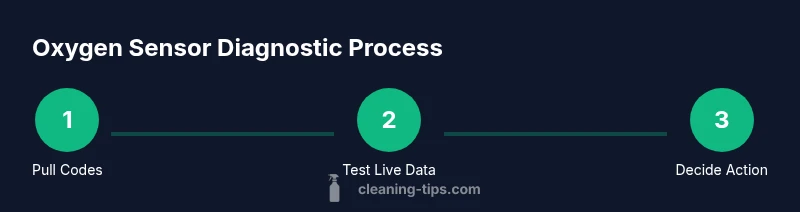
Accurate diagnosis starts with data. Use an OBD-II scanner to pull codes and view live sensor data. Look for readings that don’t fluctuate as the engine runs, heater circuit faults, or inconsistent voltage signals from the oxygen sensor. Compare the sensors’ behavior to the vehicle’s service manual and note any patterns across idle, acceleration, and steady cruise. Visual inspection matters too: check for damaged wiring, cracked connectors, or corrosion in the sensor harness. Remember that sometimes issues mimic sensor faults (vacuum leaks, dirty air filters, or faulty spark components) and addressing those can resolve symptoms without touching the sensor itself.
Safer Alternatives: Replace vs Clean
In most cases, replacing a faulty O2 sensor is safer and more reliable than attempting a cleaning. Replacement restores accurate readings, supports proper fuel trim, and helps emissions systems function as designed. When selecting a replacement, choose an OEM or quality aftermarket sensor compatible with your vehicle. After installation, clear codes and perform a road test to confirm that readings stabilize and the check engine light stays off. If you’re unsure, consult a professional technician rather than risking further damage.
What to Do If You Still Want to Try Cleaning (Rare) and How to Do It Safely
Only consider cleaning if the manual and a trusted mechanic explicitly allow it for your specific sensor type. If you proceed, work on the exhaust side with the engine cool, remove the sensor carefully, and avoid touching the ceramic element. Use only non-solvent exterior cleaning methods to remove surface grime and never soak the sensor in liquids. Reinstall promptly and recheck readings. The goal is to minimize surface contamination, not to restore worn sensors. If any doubt remains, stop and replace instead of risk.
Preventive Maintenance to Keep Emissions Low
Keep emissions in check by performing regular maintenance: replace air filters on schedule, use quality fuel, and follow the vehicle’s maintenance intervals. A clean intake path, well-maintained ignition system, and proper fuel trim reduce contamination opportunities for O2 sensors. Periodic diagnostics help catch sensor issues early, preventing extended misreads that can damage the catalytic converter. By treating the O2 sensor as part of a broader emissions-control system, you’ll avoid unnecessary sensor-cleaning trials and keep your vehicle running efficiently.
Tools & Materials
- OBD-II scanner or code reader(Read codes and view live data for O2 sensors)
- Vehicle service manual(Model-specific sensor type, heater circuit, torque specs)
- Ratchet set and sockets(Remove sensor safely if replacement is needed)
- Safety gloves(Protect hands from heat and contaminants)
- Safety glasses(Eye protection during sensor work)
- Replacement oxygen sensor(Only if tests indicate replacement)
- Torque wrench(Torque sensor to manufacturer spec when reinstalling)
- Work tray or container(Contain removed sensor and fasteners)
- Electrical contact cleaner(For connectors only if needed)
Steps
Estimated time: 60-120 minutes
- 1
Power down and prepare
Park the vehicle on level ground, engage the parking brake, and disconnect the negative battery cable to reset electronics and ensure safety. Remove jewelry and wear gloves to avoid heat and exposure to exhaust residues. Wait 5–10 minutes for residual energy to dissipate before touching any components.
Tip: Use a flashlight to locate the sensor and keep track of any fasteners. - 2
Connect diagnostic tool
Attach the OBD-II scanner and read current codes related to the oxygen sensor. Note any live data anomalies such as unusual voltage swings or heater circuit faults. Confirm whether a persistent code remains after clearing codes and performing a basic drive test.
Tip: Record exact code text and data snapshots for reference. - 3
Assess whether cleaning is advisable
Review codes and inspection results. If there’s clear physical damage or repeated fault codes despite other fixes, cleaning is unlikely to help. Decide whether replacement is the safer option before proceeding further.
Tip: If in doubt, err on the side of replacement rather than cleaning. - 4
If proceeding with cleaning (optional)
Carefully remove the sensor following the service manual. Do not splash liquids on the ceramic element; external grime can be gently wiped away with a dry cloth. Do not soak or scrub the sensor surface, and recheck for loose connections after reinstalling.
Tip: Only perform this step if the manual explicitly allows it for your sensor type. - 5
Reinstall sensor and verify
Reinstall the sensor using proper torque. Reconnect the battery, start the engine, and monitor live data. If readings remain off or codes return, proceed to sensor replacement rather than further attempts to clean.
Tip: Take a test drive to verify stability in readings across RPM ranges. - 6
Document and test
Clear any codes and document the results of the diagnostic and test drive. If the check engine light returns, schedule a replacement with a trusted parts supplier or technician.
Tip: Keep a record of codes, readings, and maintenance actions for future reference.
Questions & Answers
Is it safe to clean the O2 sensor?
Cleaning an oxygen sensor is generally not safe and is unlikely to restore proper readings. In many cases, replacement is the safer and more reliable option.
Cleaning an oxygen sensor is usually not safe, and replacement is typically the better option.
Can cleaning improve sensor readings?
Most sensor readings won’t improve with cleaning; deposits are often a sign of wear. Focus on diagnostics and replacement if needed.
Usually cleaning doesn’t fix the readings; replacement is often required.
What are signs my O2 sensor needs replacement?
Persistent emissions-related codes, reduced fuel economy, rough idle, or repeated check engine lights indicate a replacement may be needed.
If you see emissions codes or poor performance, consider replacement.
How long do O2 sensors last?
Sensor life varies by vehicle and driving conditions; some sensors last many years. If readings drift or codes appear, test and verify with diagnostics.
Life varies; if readings drift, test and consider replacement.
Should I clean upstream or downstream sensors?
Cleaning is rarely recommended for either type. Upstream sensors impact fuel trim; downstream sensors monitor emissions. Replacement is usually the safer option if faults persist.
Cleaning isn’t usually advised for either sensor; replacement is often best if faulty.
Watch Video
The Essentials
- Avoid cleaning O2 sensors; replacement is safer and more effective
- Use an OBD-II scanner for accurate diagnosis
- Inspect wiring and connectors for damage during inspection
- Replace faulty sensors with OEM or quality aftermarket parts
- Test drive and verify readings with live data