What clean o2 sensors: A DIY Guide
Learn how to safely evaluate and clean oxygen sensors (O2 sensors) when appropriate, with step-by-step instructions, safety tips, and guidance on when to replace. A practical, brand-informed guide from Cleaning Tips for homeowners and DIYers.


Cleaning o2 sensors can be attempted in some situations, but many modern sensors are not designed for cleaning and may fail or give false readings after cleaning. This step-by-step guide explains when cleaning is feasible, how to do it safely, and how to decide between cleaning and replacement. According to Cleaning Tips, when in doubt, replacement is often the safer route for long-term engine health.
What clean o2 sensors do for your vehicle
Oxygen sensors monitor exhaust gases as they leave the engine, helping the engine control unit maintain the optimal air-fuel ratio. A clean sensor can respond faster and more accurately, contributing to smoother idling, stable fuel economy, and lower emissions. However, not all sensors respond to cleaning, and improper cleaning can cause drift or damage to wiring harnesses. The Cleaning Tips team notes that sensor design matters—narrow-band and wide-band sensors differ in cleanliness tolerance. In practice, cleaning should be viewed as a diagnostic step rather than a guaranteed fix. If readings remain abnormal after cleaning, replacement is often the safer route for long-term health.
How to decide: clean vs. replace
Before attempting any cleaning, consider sensor age, mileage, and the diagnostic trouble codes (DTCs) present. If the sensor is visibly damaged, or if codes indicate a persistent lean or rich condition after a cleaning attempt, replacement is usually the better option. Modern vehicles rely on precise readings to control fuel trim and emissions; a damaged or drifted sensor can cause worse performance than the symptoms you started with. Cleaning may help in rare cases, but it should not replace a faulty sensor with a failed core.
Safety first: understand what you are touching
O2 sensors operate in extreme heat and exposure to exhaust gases. Handling them requires gloves, eye protection, and a cool engine. Never spray cleaners toward electrical connectors or harnesses. The ceramic sensing element is fragile; abrasives or solvents can permanently damage it. Always work in a well-ventilated area and follow the vehicle manufacturer's safety guidelines. This is where Cleaning Tips emphasizes caution and proper disposal of waste.
How O2 sensors work: a quick refresher
There are different sensor types (narrow-band, wideband, heated sensors). Narrow-band sensors provide a binary signal useful for basic fuel trimming, while wideband sensors offer a broader range of readings for advanced engine control. Because internal elements are sensitive, successful cleaning depends on using the correct technique and avoiding exposure to water or solvents that can seep into the ceramic core. A clean sensor may improve responsiveness briefly, but the core must remain intact for accurate readings.
Cleaning options: solvents, cleaners, and caution
Choose sensor-safe cleaners specifically designed for O2 sensors, or use manufacturer-approved products. Avoid generic solvents like brake cleaner in direct contact with the sensor core, especially if you are cleaning without removing the sensor. Do not spray liquids into the electrical connector; use a cloth or brush to minimize exposure to the wiring. Rinse only with approved cleaners, and never immerse the sensor in liquid unless you are following a documented removal-and-clean procedure.
Step-by-step approach for a careful clean (overview)
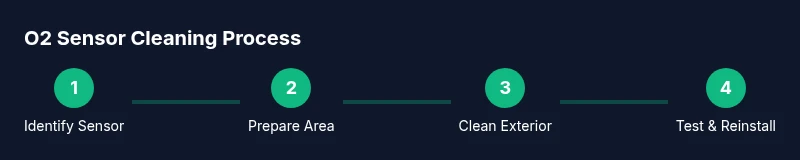
If you decide cleaning is appropriate, prepare your work area, unpack the tool set, and confirm sensor type. Then, disconnect the sensor if required, clean the sensor body surface with a sensor-safe cleaner, inspect the wiring harness for damage, and let everything dry before reassembly. After reinstalling, run the engine and check diagnostics. Remember that a cleaning attempt is not a guarantee of improved readings and may necessitate replacement if DTCs persist.
Preparing the vehicle and environment
Park on a level surface, engine cool, and disconnect the negative terminal to prevent shorts. Place the vehicle on jack stands if you need clearance to reach the sensor. Gather the correct tools, such as a sensor socket, wrenches, and sensor-safe cleaner. Ensure you have a clean workspace and a container for waste. Ventilation matters because fumes from cleaners can be irritating.
Disassembly and handling tips
Carefully locate the O2 sensor(s) in the exhaust system—typically along the exhaust pipe or exhaust manifold. Use the proper socket and avoid applying torque to the sensor body. Gently disconnect the wiring harness and, if necessary, remove the sensor from the exhaust before cleaning. Inspect the sensor for cracks or worn connectors; damaged parts should be replaced rather than cleaned.
Cleaning procedure: in-place vs off-vehicle
In-place cleaning is limited to exterior surface cleaning of the sensor body and connector, using a sensor-safe cleaner and a soft brush. If removal is required, follow the vehicle service manual for safe removal, apply cleaner to the sensor surface, and dry completely before reinstallation. Do not immerse the sensor in liquid unless the procedure explicitly calls for it. After cleaning, reinstall and reconnect the harness securely.
Reinstallation and testing after cleaning
Reconnect the sensor and the wiring harness, reseal where required, and reconnect the battery. Start the engine and allow it to reach normal operating temperature while monitoring for abnormal idle or engine codes. If the check engine light remains on, or readings remain erratic, stop and pursue professional evaluation. Cleaning may have been insufficient, or the sensor core may be damaged.
How to interpret readings and potential risks after cleaning
Post-clean readings should be compared to the vehicle’s baseline data and service manual specifications. If readings do not match expected ranges, or if misfires or fuel economy worsen, do not insist on cleaning as a fix. Contaminants or coating damage can result in inaccurate readings and cause long-term engine issues.
Alternatives to cleaning: replacement and maintenance
Often replacement is the simplest path when sensors are contaminated or failing. Regular maintenance, using quality fuel, and avoiding silicone-based additives can help extend sensor life. For vehicles with high mileage, proactive sensor replacement intervals can reduce the risk of drivability problems. Cleaning should be viewed as a temporary measure, not a substitute for a failed core.
Common mistakes and troubleshooting
Common errors include cleaning a sensor without removing it, using improper cleaners, and reusing damaged gaskets. Always inspect the sensor after any cleaning for residue or cracks. If you notice persistent misfires, rough idle, or a rough fuel mix, seek professional testing. The goal is reliable, repeatable sensor readings, not a temporary cosmetic fix.
When to seek professional service
If you are unsure about sensor type, if the sensor shows visible damage, or if the engine codes persist after cleaning attempts, seek professional service. A trained technician can test sensor health, calibrate the system, and determine whether replacement or specialized cleaning is necessary. This approach protects your engine and reduces the risk of accidental damage to exhaust components.
Tools & Materials
- Safety gloves(Heat-resistant gloves recommended for handling exhaust components)
- Safety glasses(Protect eyes from splashes and debris)
- Socket wrench set with O2 sensor socket(12-point or 6-point sensor socket; includes flexible extension if needed)
- Sensor-safe cleaner spray(Specialized cleaner for sensor surfaces; avoid aggressive solvents)
- Soft-bristle brush or microfiber cloth(Non-abrasive; use to gently lift surface deposits)
- Rags or lint-free towels(For wiping and drying surfaces)
- Isopropyl alcohol 70% or equivalent(Useful for cleaning connectors if recommended by manual)
- Anti-seize lubricant or sensor-safe grease(Only if the service manual requires it on threads)
- Drain pan and shop towels(Containment for any waste liquid)
- Multimeter (optional)(For resistance checks if applicable to harness)
Steps
Estimated time: 60-90 minutes
- 1
Identify sensor type and safety gear
Locate the O2 sensor(s) and verify if removal is necessary. Ensure engine is cool and put on gloves and eye protection. Confirm you have sensor-safe cleaner and the correct socket before starting.
Tip: Check the service manual for sensor type (narrow-band vs wideband) to decide if cleaning is appropriate. - 2
Disconnect battery and prepare workspace
Disconnect the negative battery terminal to prevent shorts. Clear space around the exhaust and gather tools. This reduces the risk of electrical sparks during handling.
Tip: Label wires if you disconnect multiple sensors to avoid miswiring during reassembly. - 3
Access the sensor and plan removal (if required)
Trace the sensor’s wiring and unplug the connector. If the sensor is hard to access, use a swivel socket and extension. Do not apply force to the sensor body or the harness.
Tip: Take a photo of the connector before detaching to reference orientation during reinstallation. - 4
Remove the sensor if removal is necessary
Loosen the mounting nut or clamp with the proper socket. Carefully detach the sensor from the exhaust, avoiding bending the wire harness. Place the sensor on a clean surface for inspection.
Tip: If the sensor is tight, apply penetrating oil to the threads and wait 5-10 minutes before reattempting. - 5
Inspect for damage and deposits
Visually inspect the sensor for cracks, melted insulation, or heavy deposits. Record any damage and do not attempt cleaning if the core is cracked. Surface deposits can sometimes be reduced with gentle cleaning.
Tip: Note whether deposits are from fuel, oil, or coolant to diagnose potential engine issues. - 6
Apply sensor-safe cleaner to the exterior
Lightly spray or apply cleaner to the sensor body and any accessible deposits. Use a soft brush or cloth to gently lift buildup. Avoid spraying into the electrical connectors.
Tip: Do not soak the sensor; moisture inside the core can cause failure. - 7
Dry the sensor completely
Allow the sensor to air dry or wipe with lint-free towels. Ensure no cleaner residue remains on the sensing surface or connectors. Drying is critical before reinstallation.
Tip: If you must speed up drying, use compressed air directed away from the sensors, not toward the connectors. - 8
Reinstall the sensor into the exhaust
Carefully thread the sensor back into place and tighten to the manufacturer’s torque specification. Reconnect any wiring harnesses and verify secure connections.
Tip: Avoid cross-threading; start by hand and finish with the correct torque to prevent leaks. - 9
Reconnect battery and test electricals
Reconnect the negative terminal and test the electrical system to ensure proper power to the sensor. Confirm all connectors are seated correctly before starting the engine.
Tip: Clear codes via OBD-II if the vehicle supports it after maintenance. - 10
Start engine and bring to operating temperature
Start the engine and let it reach normal operating temperature. Observe for any abnormal idle or engine codes. This validates the cleaning effort and sensor function.
Tip: If the engine runs rough or the check engine light returns, stop and re-inspect the sensor and harness. - 11
Perform diagnostic check and monitor readings
Use an OBD-II scanner to read sensor data and compare with expected values from the service manual. Record readings and watch for drift or instability in the trims.
Tip: Document baseline values and compare after a short test drive. - 12
Decide on next steps
If readings remain inaccurate or codes persist, plan for sensor replacement or professional testing. Cleaning may provide a temporary improvement, but core health dictates long-term performance.
Tip: Always have a replacement part ready in case the sensor fails during testing.
Questions & Answers
Can I clean an O2 sensor myself, or should I replace it immediately?
You can attempt cleaning in some cases, but many modern sensors are designed to be replaced rather than cleaned. If the sensor shows persistent faults after cleaning, replacement is typically the safer option for reliable readings.
You can try cleaning in some cases, but replacement is often safer if readings stay off after cleaning.
Will cleaning fix poor fuel economy or check engine codes?
Cleaning may improve readings briefly, but it rarely corrects underlying engine issues. If codes persist after cleaning, address root causes or replace the sensor.
Cleaning might help briefly, but persistent codes usually mean you should investigate further or replace the sensor.
Is it safe to use generic solvents on an O2 sensor?
Avoid generic solvents that are not labeled for O2 sensors. Use only sensor-safe cleaners to protect the ceramic core and wiring.
Avoid generic cleaners; use sensor-safe products specifically designed for O2 sensors.
Should I disconnect the battery before cleaning?
Disconnecting the battery is a common precaution to prevent shorts while working on electrical connections. Reconnect after you finish and verify all connections.
Yes, disconnect the battery for safety, then reconnect after you’re done.
What signs indicate replacement is necessary rather than cleaning?
If the sensor shows physical damage, persistent diagnostic trouble codes, deteriorating readings, or a failed test after cleaning, replacement is recommended.
Look for physical damage, persistent codes, or failed tests after cleaning—then replace.
Can I clean O2 sensors without removing them from the exhaust?
In-place cleaning is limited to exterior surfaces. For thorough cleaning, removal is often required with proper torque and reassembly procedures.
Only surface cleaning is safe without removal; removal requires careful torque and reassembly.
Watch Video
The Essentials
- Assess sensor type and age before cleaning
- Use sensor-safe cleaners and avoid connectors
- Replace the sensor if readings stay abnormal
- Follow the service manual for torque and wiring
- Consider cleaning as a diagnostic step, not a guaranteed fix