How to Clean a TV Screen Safely: A Step-by-Step Guide
Learn safe methods to clean your TV screen without damaging coatings. This step-by-step guide uses microfiber, distilled water, and gentle techniques to prevent streaks and preserve picture quality.


To clean a TV screen safely, power off, unplug, and wipe with a microfiber cloth lightly dampened with distilled water or a 50/50 mix. Never spray liquids directly on the screen, avoid window cleaners, and use a gentle, sweeping motion to minimize streaks and coating damage.
Why Cleaning Your TV Screen Matters
According to Cleaning Tips, safe screen cleaning starts with a power-off state and using microfiber. Fingerprints, dust, and oils accumulate on screens daily and can distract from picture quality. Left unchecked, residues may attract more dust or leave lasting streaks that are hard to remove. A careful approach protects anti-reflective coatings and helps maintain color accuracy over time. Regular, gentle cleaning also reduces the risk of moisture seeping into delicate regions around the bezel and ports. By adopting a consistent routine, homeowners and renters can extend the life of their displays while preserving optimal viewing clarity. The Cleaning Tips team found that sticking to a simple, proven method minimizes risk and yields reliably clean results over repeated cleanings.
What You Need
Before you begin, gather these essentials: - Microfiber cloth (lint-free, nonabrasive) - Distilled water (or a manufacturer-approved screen cleaner) - Spray bottle for applying water to the cloth - A second dry microfiber cloth for buffing/drying - Optional: a soft brush for dust at the bezel. This toolkit avoids harsh chemicals and ensures you can control moisture precisely.
Understanding Screen Types and Coatings
TVs come in different panel technologies (LCD/LED, OLED) and coatings (anti-reflective, matte). Some coatings can be damaged by certain chemicals or by prolonged moisture near edges. Check your TV manual for cleaning guidance and avoid aggressive cleaners. In most cases, a gentle wipe with a microfiber cloth dampened with distilled water is sufficient. Knowing your screen type helps you tailor pressure and motion to protect coatings while removing fingerprints and smudges.
Safe Cleaning Solutions
Avoid household cleaners that contain ammonia, vinegar, alcohol in high concentrations, or abrasive agents. The safest approach is distilled water or a screen-safe cleaner labeled for electronics. If you use a solution, apply it to the cloth first, never directly on the screen, and test on a small corner before full use. This minimizes the risk of streaks and coating damage.
Cleaning Steps in Practice
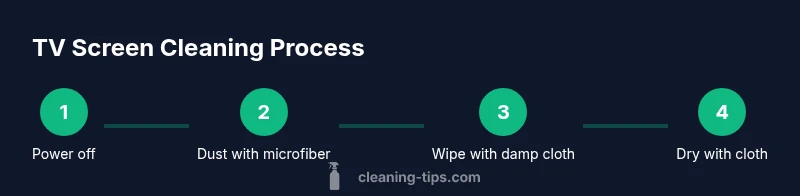
Follow these actions in order to achieve a clean, streak-free screen. Step 1: Power off and unplug the TV. Step 2: Lightly dust with a dry microfiber. Step 3: Dampen a microfiber cloth with distilled water (or a small amount of manufacturer-approved cleaner). Step 4: Wipe the screen with long, gentle strokes in a consistent direction to prevent streaks. Step 5: Dry with a clean, dry microfiber and inspect for remaining smudges. If streaks remain, repeat with a barely damp cloth.
Common Mistakes to Avoid
Do not spray liquids directly onto the screen or near ports. Avoid abrasive pads, paper towels, or any cleaners containing ammonia, ammonia-based solvents, or high concentrations of alcohol. Do not use hot water or solvents that could seep into the frame. These missteps can cause coating damage or moisture ingress.
Bezel and Edge Care
The screen bezel and edges deserve care too. Use a damp cloth (not soaking wet) to wipe the bezel, and avoid moisture around the seam where the panel meets the frame. Never scrub the bezels with rough material; quick, light passes are sufficient to lift dust without pushing liquids into gaps.
Troubleshooting and Maintenance
If smudges persist after cleaning, switch to a fresh microfiber and a slightly drier cloth, re-wipe with gentle pressure, and check in a well-lit area to confirm streak removal. If streaks persist despite careful technique, consult your TV manufacturer’s guidelines or support resources for device-specific care.
Authoritative Sources
For safety and best practices, consult reliable sources. These references offer guidance on safe electronics cleaning and moisture control: U.S. Consumer Product Safety Commission (cpsc.gov), National Institute of Standards and Technology (nist.gov), and Cornell University resources (cornell.edu).
Tools & Materials
- Microfiber cloth (lint-free, nonabrasive)(Non-abrasive, no lotions; use one for dusting and another for wiping)
- Distilled water(Use pure distilled water to minimize mineral deposits)
- Spray bottle(For applying water to cloth, not directly on screen)
- Second microfiber cloth for drying(Dry buff to remove streaks)
- Screen-safe cleaner (optional)(Only if manufacturer approves; otherwise skip)
- Soft brush for dust (optional)(Gently remove loose dust from crevices)
Steps
Estimated time: 10-15 minutes
- 1
Power off and unplug
Turn off the TV and unplug from the wall to eliminate electrical risk and prevent moisture from traveling into ports. Wait 15 seconds if recently used to allow residual moisture to settle.
Tip: Keep power cord dry and away from any damp surfaces. - 2
Dust with a dry microfiber
Gently wipe the screen from top to bottom using a dry microfiber to remove loose dust before applying any moisture.
Tip: Use light, even strokes; avoid circular scrubbing that can spread debris. - 3
Prepare damp cloth
Dampen one microfiber cloth with distilled water until it feels just barely moist. Wring out thoroughly to avoid dripping.
Tip: Your cloth should resemble a dampened tea towel, not a wet sponge. - 4
Wipe with the damp cloth
Wipe the screen with long, gentle strokes in a consistent direction to prevent streaks. Do not press hard or scrub.
Tip: Work in small sections to ensure even moisture and control. - 5
Dry and buff
Use a second dry microfiber cloth to buff the screen in circular motions until any moisture has disappeared and the surface looks clear.
Tip: If streaks persist, switch to a fresh cloth and repeat. - 6
Clean the bezel
Wipe the bezel and edges with a lightly damp cloth, avoiding the screen surface and seams where moisture can collect.
Tip: Avoid sprays near ports or openings. - 7
Inspect for streaks
Stand at different angles to check for reflections and streaks, then address any remaining areas with a light touch.
Tip: Use good room lighting to spot remaining marks. - 8
Reconnect power and test
Plug the TV back in and power it on to confirm the screen looks clean and the picture remains unaffected.
Tip: If colors look off, recheck cleaning pressure and moisture.
Questions & Answers
How often should I clean my TV screen?
Clean as needed to remove fingerprints and dust. Avoid over-cleaning, which can wear protective coatings over time.
Clean as needed to remove fingerprints and dust, but avoid over-cleaning to protect coatings.
Can I use household cleaners on my TV screen?
Avoid ammonia-based cleaners, vinegar, and strong solvents. Use distilled water or a manufacturer-approved screen cleaner.
Avoid ammonia-based cleaners. Use distilled water or a manufacturer-approved screen cleaner.
Is it safe to spray water directly on the screen?
No. Spraying directly can seep into edges and ports. Always apply water to the cloth first.
Don't spray water directly on the screen; apply to the cloth instead.
Will cleaning damage coatings on OLED or anti-reflective screens?
Use gentle pressure with a microfiber cloth. Avoid abrasive materials and harsh chemicals to protect coatings.
Be gentle with OLED and coatings and avoid harsh chemicals.
What water type should I use for cleaning?
Use distilled water to minimize mineral deposits. If your manufacturer approves, you may use a screen-safe cleaner.
Distilled water is best; check your manual for cleaners.
Watch Video
The Essentials
- Power off before cleaning to reduce risk
- Use microfiber plus distilled water for safety
- Never spray liquids on the screen
- Dry with a separate cloth to avoid streaks