How to Clean a Flat Screen TV Safely
Learn safe, effective methods and the best tools for cleaning a flat screen TV. Discover what to use, what to avoid, and a step-by-step routine to keep your display pristine without damage.


By following proper technique, you will learn what do you use to clean a flat screen tv effectively and safely. The key requirements are a microfiber cloth, a mild cleaning solution (or distilled water), and the caution not to spray cleaners directly onto the screen. This quick guide helps you avoid streaks and coatings damage while keeping your display pristine.
Why proper cleaning matters
Keeping a flat screen TV clean isn't just about aesthetics. Dust, fingerprints, and smudges can reduce clarity, increase glare, and, over time, affect coating integrity. According to Cleaning Tips, consistent, gentle cleaning preserves brightness and prolongs the screen's life. If you're wondering what do you use to clean a flat screen tv, the safe answer begins with the right tools, then proceeds to a cautious, repeating routine. A clean screen enhances viewing comfort, reduces eye strain, and helps your home theater setup look its best in any lighting condition. Avoid rubbing hard or using abrasive materials, which can scratch coatings or push dust into crevices. For best results, pair careful wiping with routine dusting and periodic inspection of edges where moisture can accumulate.
Note: Always power down the TV before cleaning to minimize the risk of electric shock or accidental input during the process.
What to use and what to avoid
Safe cleaning starts with simple, gentle materials. Use a clean microfiber cloth, preferably two: one damp for lifting oils and dust, and one dry for finishing and buffing. For the cleaning solution, distilled water is the safest base; you can add a few drops of mild dish soap if the screen is sticky. If you must tackle stubborn smudges, a small amount of isopropyl alcohol (70% or less) diluted with distilled water can be used, but never spray directly on the screen. Ammonia, vinegar, window cleaners, or abrasive pads can damage coatings and should be avoided. If you have a spray bottle, spray onto the cloth, not the screen, and wring out excess liquid so the cloth is barely damp. Keep liquids away from ports and speaker openings to prevent moisture intrusion.
Prep two clean cloths and a soft brush or canned air for dusting around the frame. This reduces residue transfer during the wipe and keeps the display streak-free.
Step-by-step cleaning method (overview)
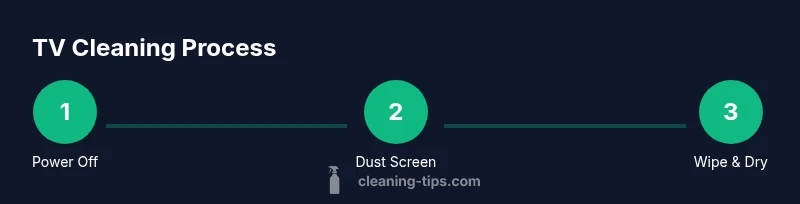
This section provides the practical framework for safe cleaning. Start by turning off the TV and unplugging it; this prevents any electrical issues and reduces static. Dust the surface with a dry microfiber cloth using light, horizontal strokes. For fingerprints or sticky residues, prepare a cloth dampened with distilled water or a mild solution; avoid soaking. Wipe the screen gently in smooth, even motions from top to bottom, never applying heavy pressure or circular scrubbing that could damage the coating. For the bezel and frame, use a damp cloth and wipe with care, avoiding moisture near ports and openings. Finally, dry the screen with a clean, dry microfiber cloth and inspect for streaks. Store cloths in a clean, dry place to prevent re-contamination. If any smudges persist, repeat with a fresh cloth and avoid rewetting the same area excessively.
This routine minimizes streaking and preserves the display’s reflective properties while keeping the viewing experience clear.
Cleaning around the bezel, ports, and remotes
Screens are delicate, but the surrounding areas collect dust and fingerprints too. Use a separate damp cloth for the bezel and the back panel, avoiding moisture near speaker grilles and vent openings. For remote controls, wipe with a microfiber cloth lightly dampened with the same cleaning solution; never pour liquid into crevices or vent slots. Dust around the TV stand and cables with a dry brush or microfiber, then wipe down with a barely damp cloth. Regular attention to these areas prevents grime migration to the screen and preserves overall aesthetics, especially in high-traffic living rooms.
Keep your cleaning routine gentle and consistent for the best long-term results.
Troubleshooting: streaks, glare, and coating protection
If streaks appear, switch to a fresh microfiber cloth and ensure the cloth is only lightly damp, not wet. Excess moisture can seep into seams and cause issues over time. Streaks can also result from cleaners that are too harsh or from using old, dirty cloths. For glare reduction, apply even pressure in a consistent direction, typically top-to-bottom. OLED and other sensitive coatings may respond differently; if in doubt, consult the manufacturer manual. Regular maintenance—dusting weekly and wiping monthly—helps prevent stubborn buildup. If you see discoloration or unusual brightness changes, stop using cleaners and contact support to avoid voiding warranties.
Maintenance and long-term care
A sustainable cleaning plan keeps your screen looking new without risking damage. Establish a simple routine: dust with a dry microfiber cloth at least once a week, wipe with a slightly damp cloth monthly, and perform a deeper clean as needed based on living conditions (pets, kids, or smoking). Save a dedicated storage space for cleaning cloths to avoid cross-contamination with other household textiles. Avoid household cleaners with ammonia, vinegar, citrus, or acetone, as these can degrade coatings over time. Use filtered or distilled water to minimize mineral deposits that can leave faint streaks. By treating your TV with gentle, consistent care, you’ll preserve image quality and panel longevity.
Quick safety reminders and best practices
- Always unplug the TV before cleaning. - Use a microfiber cloth, never abrasive materials. - Spray cleaner onto cloth, not onto the screen. - Do not saturate the cloth; target a barely damp surface. - Avoid harsh chemicals that can degrade screen coatings. - Dry the screen fully after cleaning to prevent moisture from seeping into seams.
Tools & Materials
- Microfiber cloths (at least 2)(One damp for cleaning, one dry for buffing; avoid fabric with rough texture)
- Distilled water(Used as a base for diluting cleaners; avoid tap water with minerals)
- Mild dish soap(Optional for sticky residue; use 1-2 drops per cup of distilled water)
- Isopropyl alcohol (70% or less)(Only when diluted with distilled water; never apply directly to screen)
- Spray bottle(For applying a light mist to cloth, not to screen)
- Soft brush or canned air(Dusts around bezels and ports; avoid blowing into internal components)
- Cotton swabs(Use sparingly for tight corners near edges)
Steps
Estimated time: 20-25 minutes
- 1
Power off and unplug
Turn off the TV and unplug from the wall. Allow the device to cool and reduce risk of electrical shock while you work. This step also minimizes static that can attract dust during cleaning.
Tip: If the room is bright, wait a few minutes for any glare to settle before starting. - 2
Dust the screen with a dry cloth
Gently wipe a dry microfiber cloth across the screen using horizontal strokes to lift loose dust. Avoid pressing hard; pressure can distort the coating or push dirt into edges.
Tip: Use a fresh section of the cloth if you see embedded dust in the fabric. - 3
Prepare a damp cleaning cloth
Dampen a microfiber cloth with distilled water or a mild solution; wring out excess liquid so the cloth is barely damp. Never spray liquid directly onto the screen.
Tip: Test the cloth on a corner first to ensure no color transfer or streaking. - 4
Wipe the screen gently
Wipe the screen with the damp cloth using light, even strokes from top to bottom. For stubborn smudges, a second pass with a fresh cloth is often effective.
Tip: Do not circle aggressively; consistent vertical or horizontal strokes work best. - 5
Clean the bezel and ports
Use a barely damp cloth to wipe the frame, paying attention to the bezels and edges; keep moisture away from ports and speaker openings.
Tip: Use cotton swabs for tight corners but avoid applying liquid into openings. - 6
Dry and inspect
Finish with a dry microfiber cloth to remove any remaining moisture and examine the screen for streaks or spots. If needed, repeat with a fresh cloth.
Tip: A second quick pass often eliminates streaks you notice under lighting.
Questions & Answers
What should I use to clean my flat screen TV without damaging the coating?
Use a microfiber cloth dampened with distilled water or a manufacturer-approved screen cleaner. Never spray cleaners directly on the screen, and avoid ammonia or acetone-based products to protect coatings.
Use a microfiber cloth lightly dampened with distilled water or a recommended screen cleaner. Do not spray cleaners on the screen; avoid harsh chemicals that could damage the coating.
Can I use water alone to clean the screen?
Yes, distilled water alone is a safe starting option. If fingerprints persist, add a couple of drops of mild dish soap per cup of distilled water, then wipe with a damp cloth followed by a dry cloth.
Water alone is safe, especially distilled water. If needed, add a tiny amount of mild soap and wipe with a damp cloth, then dry thoroughly.
Is it okay to use alcohol or vinegar on OLED or LCD screens?
Avoid using alcohol or vinegar on most modern displays. These can damage coatings. If you must tackle stubborn residue, use a very diluted alcohol solution and test first on a corner.
Avoid alcohol or vinegar on OLED or LCD screens. If you must use it, dilute and test first.
How often should I clean my TV screen?
Clean as needed when you notice dust or fingerprints. A light weekly dusting plus monthly wipe-downs works for most living rooms, with more frequent care in dust-prone spaces.
Clean when you notice dust or fingerprints. Most people dust weekly and wipe monthly, adjusting for your environment.
What should I do if liquid enters ports or the back of the TV?
Unplug the TV immediately and allow to dry completely before powering on. If you suspect internal moisture, contact support or a professional technician.
If liquid gets near ports, unplug and let it dry completely before using again; seek professional help if unsure.
Watch Video
The Essentials
- Power off before cleaning to prevent shock and static.
- Use microfiber cloths and distilled water for safe results.
- Spray onto the cloth, not the screen, to avoid damage.
- Avoid ammonia and vinegar-based cleaners on coatings.
- Dry thoroughly and inspect for streaks after cleaning.