How to Clean Your Phone: Safe and Effective Methods
Learn how to clean your phone safely, remove grime and germs, protect coatings, and extend device life with practical steps, tools, and maintenance routines from Cleaning Tips.


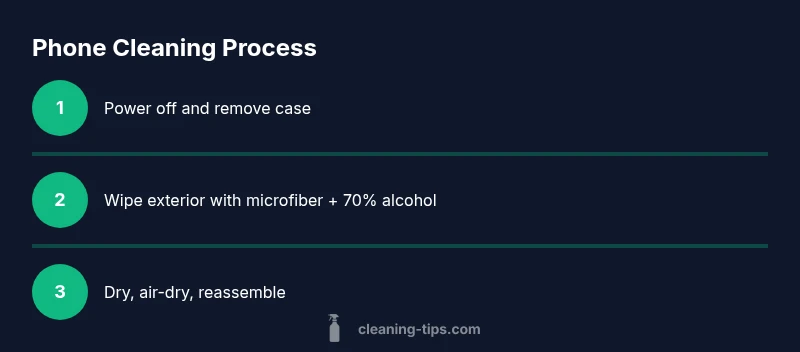
To clean your phone safely, power it off and remove the case. Start with a dry microfiber wipe, then use a 70% isopropyl alcohol wipe on exterior surfaces, avoiding ports and the screen unless manufacturer guidance allows it. Wipe in straight lines and let it air-dry before reassembly.
Why cleaning your phone matters
Your phone is a high-touch device that collects oils from skin, fingerprints, dust, and environmental grime. Over time, this buildup can smear the display, interfere with touch responsiveness, and transfer grime to your hands and nearby surfaces. Regular cleaning helps restore screen clarity, reduces sticky residues, and keeps accessories—like cases and screen protectors—lasting longer. The goal is to remove surface contaminants without saturating the device, preserving coatings, cameras, and speakers. Follow manufacturer guidelines for liquids and avoid strong cleaners near ports or the charging port. A careful routine supports healthier habits and a cleaner home environment.
Safe cleaning agents and why they work
Experts recommend simple, alcohol-based solutions for devices. A 70% isopropyl alcohol solution or pre-moistened wipes are effective at removing oils and microbes from hard, nonporous surfaces. Use a microfiber cloth to distribute the liquid evenly; avoid spraying directly onto the phone. For screens with special coatings, always check the manufacturer’s guidelines. Mild soap and water can be appropriate for detachable cases or accessories, but never apply water to the phone itself. This approach minimizes moisture risk while maximizing cleanliness.
Tools and materials you’ll want
Gather a microfiber cleaning cloth, 70% isopropyl alcohol wipes or a solution, a soft-bristled brush for crevices, and a lint-free dry cloth for the final wipe. If you clean a case, keep mild soap solution handy for disinfection. Store these tools in a clean, dedicated spot to avoid cross-contamination with household cleaners.
A practical cleaning approach (high-level)
Adopt a zone-based method: exterior surfaces first, then the camera lens and sensors with a gentler touch, and finally the ports and speaker grilles. Keep liquids away from openings and never saturate the device. Use straight-line motions rather than circular scrubbing to avoid micro-scratches. Allow a brief air-dry period between steps to prevent moisture from seeping into gaps.
Common mistakes to avoid
Avoid direct sprays on the device—always apply liquids to the cloth. Do not use bleach, ammonia, or acetone-based cleaners, especially on the screen coating or oleophobic layer. Never clean electronics while plugged in. If you notice sticky residues, switch to a fresh microfiber cloth rather than reusing a dirty one. Rushing the process can trap moisture in ports or seams.
Cleaning a phone case and accessories
Cases can accumulate grime quickly. Remove the case and wash it with mild soap and warm water if it’s plastic or silicone. Wipe fabric cases with a damp cloth and mild detergent, then air-dry completely before reassembling. Don’t forget to wipe charging cables and headphones with a dry cloth to remove dust and oils. In all cases, ensure no moisture drips into device ports when reassembling.
Maintenance and future-proofing
Create a simple cleaning cadence—a quick wipe weekly for typical use and a deeper clean biweekly if you share the device or have high-touch environments. Keep liquids away from ports and screens, and store your cleaning tools in a breathable container. Consider a screen protector and a compatible case as part of your long-term care plan to minimize direct contact with cleaning agents.
Troubleshooting and when to seek help
If cleaning leaves streaks, fogging, or discoloration, stop using liquids and consult the device manufacturer’s care guidelines. Persistent issues such as unresponsive touch or charging problems after cleaning may indicate moisture intrusion or component damage that requires professional inspection. In such cases, contact an authorized service provider.
Tools & Materials
- Microfiber cleaning cloth(Lint-free and soft; suitable for screens)
- 70% isopropyl alcohol wipes or solution(For exterior surfaces; avoid liquid entering ports)
- Soft-bristled brush or unused toothbrush(Gently dislodge dust from crevices)
- Distilled water spray bottle(Only for very mild cleaners; never spray directly on device)
- Mild soap (for cases) and warm water(Use on detachable cases; ensure case is fully dry before reassembly)
Steps
Estimated time: 15-20 minutes
- 1
Power down and remove the case
Turn off the phone completely and detach the case. This minimizes input risk and prevents liquid from seeping into ports. If the case is bulky, set it aside to avoid contact with cleaning agents near the device.
Tip: Powering down first reduces the risk of electrical short and helps you see grime clearly. - 2
Dry wipe to remove surface dust
Use a dry microfiber cloth to lift dust and oils from the back, sides, and screen edge. This step reduces moisture transfer later and prevents grinding dirt into coatings.
Tip: A quick dry pass keeps the wet step shorter and cleaner. - 3
Lightly dampen and wipe exterior surfaces
Lightly dampen the cloth with a 70% isopropyl alcohol solution or use a wipe, then wipe the exterior in straight, even strokes. Do not spray directly on the device and avoid ports, speakers, and the screen edges.
Tip: Maintain minimal moisture; never saturate the cloth. - 4
Clean the camera lens and sensors
Gently wipe the camera lens with a clean section of the microfiber cloth. Apply light pressure and avoid circular scrubbing that could scratch coatings. If needed, use a new cloth area for the lens.
Tip: Be extra careful around glass surfaces to prevent micro-scratches. - 5
Address ports and crevices
Use a soft brush or compressed air from a safe distance to dislodge debris near ports and grilles. Do not introduce liquids into openings. If moisture enters a port, allow it to dry fully before powering on.
Tip: Keep moisture away; moisture near connectors can cause corrosion. - 6
Dry and air-dry before reassembly
Wipe away any remaining moisture with a dry microfiber cloth and let the device air-dry for a few minutes. Reattach the case only after you are confident it’s completely dry.
Tip: Patience prevents moisture from lingering and causing issues. - 7
Power on and test
Power the device back on and check touchscreen responsiveness, speaker clarity, and camera focus. Ensure peripherals like the charging cable fit properly before use.
Tip: If you notice issues, consult support before using cleaners again.
Questions & Answers
Is it safe to use alcohol-based wipes on my phone?
Yes, on exterior nonporous surfaces if the manufacturer allows it. Avoid the screen if guidance warns against it and always wipe with a dry section after using a damp wipe.
Alcohol wipes are safe for exterior surfaces if your manufacturer allows it; always wipe gently and dry afterward.
Can I use water to clean my phone?
Use minimal moisture—prefer a damp cloth over spraying water. Water can damage internal components and should not be directed into ports or speakers.
Water should not be sprayed on the device; use a barely damp cloth instead.
Should I clean the ports and speakers?
Yes, use a soft brush or compressed air from a safe distance to dislodge debris. Avoid liquids near openings and never spray into ports.
Keep liquids away from ports; use a dry brush to clear debris.
How often should I clean my phone?
Clean as needed to remove grime and residue. If you touch your phone frequently, consider a routine every few weeks.
Clean as needed; if you use it daily, a routine every few weeks works well.
Can I use household cleaners like bleach or ammonia?
Avoid household cleaners with harsh chemicals. They can damage coatings and seals on devices.
Avoid bleach and ammonia on phones; use manufacturer-approved cleaners only.
What about screen protectors and cases?
Clean edges carefully around protectors and cases. Remove the protector if it shows discoloration and replace with a fresh one as needed.
Follow the protector’s care guidelines and replace if needed.
Watch Video
The Essentials
- Power down and remove the case before cleaning.
- Use a microfiber cloth with 70% isopropyl alcohol on nonporous surfaces.
- Avoid moisture near ports and the screen edge.
- Allow the device to air-dry completely before reassembly.
- Follow manufacturer guidelines for coatings and case materials.