How to Clean a QLED TV Screen Safely
Learn a safe, step-by-step method to clean your QLED TV screen without damaging coatings. Discover tools, techniques, and maintenance tips from Cleaning Tips. A reliable guide for homeowners and renters.


To safely clean a QLED TV screen, power off, unplug, and wipe with a microfiber cloth lightly dampened with distilled water. According to Cleaning Tips, this gentle, minimal-moisture method protects anti-reflective coatings better than sprays. Avoid direct liquids on the panel, never use harsh chemicals, and never scrub with abrasive materials.
Why a QLED screen requires gentle cleaning
QLED televisions rely on delicate surface coatings and layered optics to deliver vivid color and sharp contrast. Harsh chemicals, ammonia-based sprays, or abrasive cloths can dull coatings, smear the display, or even cause micro-scratches that become visible over time. A gentle, low-moisture approach preserves picture quality and longevity. Cleaning Tips notes that most routine cleanings can be accomplished with a clean microfiber cloth and distilled water, reducing mineral residue and preventing streaks. For households with kids or cooking odors, a light, regular wipe is often enough to keep dust at bay without risking performance. By treating the screen with care, you maintain the original brightness, color accuracy, and viewing experience that draw you to your QLED panel.
Safety guidelines before you start
Powering down is essential. Ensure the TV is off and unplugged to avoid any electrical shock or short circuits while you clean. Do not spray liquids directly onto the screen; instead, apply liquid to a cloth. Keep liquids away from ports, speakers, and the backside of the panel. If you notice any unusual discoloration or coating damage, pause cleaning and consult the manufacturer’s manual. Cleaning Tips emphasizes using the gentlest materials first and avoiding aggressive rubbing that can worsen smudges or micro-scratches.
Tools and materials overview (keep it simple and safe)
For most QLED screens, a single, clean microfiber cloth and distilled water are enough. Optional items include a spray bottle for light dampening, a manufacturer-approved screen cleaner, and a soft brush or compressed air to dislodge dust from edges. Always ensure any cleaner is designed for electronics and approved for screens. The goal is to minimize moisture and avoid contaminating ports. If you choose to use a cleaner, test on a small, inconspicuous area first to confirm it does not leave a residue or haze.
Cleaning cadence and preventative care
Set a regular but light cleaning cadence—dust buildup can affect perceived contrast and brightness over time. Establish a routine: dust weekly with a dry microfiber, then wipe every few weeks with a slightly damp cloth if needed. Avoid aggressive scrubbing and never use paper towels, kitchen towels, or abrasive rags. Keep the room’s humidity stable and consider a purifier if you notice persistent dust in the room. By integrating these practices into your routine, you’ll extend the life of coatings and preserve the screen’s original quality.
Troubleshooting common issues after cleaning
If you notice streaks, haze, or a faint film after cleaning, switch to a drier microfiber pass and re-wipe with distilled water only. For stubborn smudges, apply a minimal amount of cleaner approved by the manufacturer to the cloth—not directly onto the screen—and wipe gently. If residue persists on curved edges, use the cloth’s edge to reach the curve without applying pressure. If the display looks uneven or discolored, stop cleaning and consult technical support to avoid voiding the warranty.
Tools & Materials
- Microfiber cleaning cloth (lint-free)(Choose a soft, non-abrasive cloth; wash separately before first use)
- Distilled water(Avoid tap water or mineral-rich liquids that can leave residue)
- Spray bottle (optional)(Fill with distilled water; spray lightly onto cloth, never directly on screen)
- Manufacturer-approved screen cleaner (optional)(Only use if explicitly recommended by the TV manufacturer)
- Soft brush or compressed air (optional)(Gently remove dust from edges and ports; avoid spraying near the screen)
Steps
Estimated time: 15-25 minutes
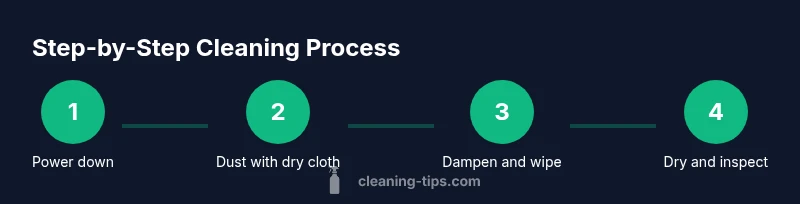
- 1
Power down and unplug
Turn off the TV and unplug the power cord. This minimizes the risk of electric shock and prevents the screen from powering on during cleaning. Wait 60 seconds for any capacitors to discharge before starting.
Tip: Disconnecting power is a non-negotiable safety step; never begin cleaning while the device is plugged in. - 2
Dust the surface gently
Use a dry microfiber cloth to remove loose dust from the screen surface and frame. Move from top to bottom with light, vertical strokes to avoid pushing dust into crevices.
Tip: Keep the cloth flat and avoid circular scrubbing that can grind particles into the coating. - 3
Moisten the cloth, never the screen
Dampen a corner of the microfiber cloth with distilled water or a manufacturer-approved cleaner. Squeeze out excess moisture so the cloth is just damp, not wet.
Tip: Spray onto the cloth lightly; never spray directly onto the screen. - 4
Wipe with care
Gently wipe the screen with long, smooth strokes from edge to edge. Avoid applying pressure on the panel; focus on removing smudges and fingerprints with minimal moisture.
Tip: Use the damp section for smudges and a dry section for any streaks. - 5
Dry and inspect
Use the dry portion of the cloth to remove any remaining moisture and buff the surface. Inspect under good lighting for uniform clarity and to ensure no damp spots remain.
Tip: If you see streaks, finish with a light pass using a dry quarter of the cloth. - 6
Frame and ports check
Wipe the plastic frame around the screen with a damp cloth, taking care not to let liquid enter speaker grilles or ports. Gently dry the frame with a separate dry area of the cloth.
Tip: Be especially careful around the bottom edge and any vent openings. - 7
Reconnect and test
Plug the TV back in and power it on. Quickly verify that the display looks uniform and free of smudges. If you notice residual marks, repeat the damp-dry cycle with very light pressure.
Tip: Don’t over-clean; frequent, gentle cleaning is better than intense scrubbing. - 8
Optional deeper cleaning (only if approved)
If stubborn residue remains, consult the manual for any approved deep-clean steps or contact support. Avoid harsh chemicals and always apply to the cloth, not the screen.
Tip: Only attempt a deeper clean if the manufacturer permits specific products.
Questions & Answers
Can I use water alone to clean a QLED screen?
Yes, using a microfiber cloth lightly dampened with distilled water is generally safe for QLED screens. Avoid direct spraying and never use tap water that may leave mineral streaks.
Water can work on a damp microfiber cloth, but never spray water on the screen. Use distilled water and gentle motions.
Is isopropyl alcohol safe on QLED screens?
Alcohol can damage certain coatings. If the manufacturer allows, use a highly diluted solution and apply to the cloth, not directly to the screen.
Alcohol can harm coatings, so only use it if your manual says it’s okay and always on the cloth.
Can I use paper towels or rough cloths on the screen?
No. Paper towels and rough materials can scratch or abrade the coating. Stick to a clean microfiber cloth.
Paper towels can scratch the screen; use a microfiber cloth instead.
Will cleaning void the TV warranty?
Cleaning with manufacturer-approved methods and products typically does not void the warranty. Always follow the manual’s guidance and avoid improper cleaners.
Cleaning with proper products usually won’t void the warranty, but check your manual for specifics.
How often should I clean my QLED screen?
Clean as needed to remove dust and fingerprints. A light weekly dusting and a gentle wipe every few weeks is usually sufficient.
Wipe when you notice dust or smudges; don’t over-clean the screen.
What about direct sprays or cleaners on the screen?
Direct spray onto the screen is not recommended. Apply cleaner to the cloth only and wipe gently.
No direct sprays on the screen—always apply to the cloth first.
Watch Video
The Essentials
- Use a microfiber cloth with distilled water.
- Never spray directly onto the screen.
- Power down and unplug before cleaning.
- Apply minimal moisture and gentle strokes.
- Test cleaners on a small area first.