Is It OK to Clean a TV Screen with Windex? A Practical Guide
Discover whether Windex is safe for TV screens and learn screen-safe cleaning methods from Cleaning Tips. Practical steps, safety tips, and recommended tools for a healthier home.


Is it ok to clean a tv screen with windex? Not typically. Ammonia-based cleaners like Windex can damage LCD and OLED coatings over time. Most manufacturers recommend a gentle approach using a microfiber cloth lightly dampened with distilled water or a screen-safe cleaner. Never spray cleaner directly on the screen; apply to the cloth and wipe with light, even strokes.
Is Windex Safe on TV Screens? A Quick Reality Check
is it ok to clean a tv screen with windex? Not typically. Ammonia-based cleaners can degrade the delicate coatings on LCD, LED, OLED, and plasma panels over time. The protective coatings that keep brightness and color intact can be damaged by harsh chemicals. For most TVs, manufacturer guidelines recommend a gentle approach using a microfiber cloth, distilled water, and, if needed, a cleaner specifically labeled safe for screens. Never spray cleaner directly onto the screen; apply to the cloth and wipe with light, even strokes. This simple check helps homeowners and renters avoid permanent damage and keep displays clear longer. According to Cleaning Tips, following a conservative cleaning regimen preserves screen longevity and preserves warranty coverage when possible.
Understanding Screen Coatings and Why They Matter
Modern TV panels rely on anti-reflective and oleophobic coatings to keep smudges away and colors true. These coatings can be delicate and are not designed to withstand harsh solvents. Ammonia, alcohol, and other aggressive cleaners can strip the coating layers, causing halos, streaks, or a permanent hazy appearance. Even if a solution seems to remove grime, it may compromise visibility over time. Cleaning Tips recommends using only products labeled safe for LCD/LED screens and avoiding direct contact with cleaning agents. The goal is to remove oils and dust without altering the surface chemistry of the display.
Approved Cleaning Materials for TVs
Choose items that are gentle and specifically designed for screens. Essentials include a soft, lint-free microfiber cloth and distilled water as the primary cleaning fluid. If you prefer a liquid cleaner, select a product marketed as safe for electronics or screens, and ensure it does not contain ammonia or high concentrations of alcohol. A dedicated screen-cleaning spray can be useful, but always apply it to the cloth—never directly onto the screen. Optional accessories like a soft anti-static brush can help lift trapped dust before wiping. Cleaning Tips emphasizes starting with dry dusting to minimize moisture exposure and reduce the need for liquids.
What Manufacturers Recommend: Reading the Fine Print
Always consult your TV’s user manual for cleaning instructions. Many manufacturers advise turning off and unplugging the television before cleaning, then using a microfiber cloth slightly dampened with distilled water. Some brands approve proprietary cleaners; others recommend plain water only. If your manual permits cleaners, ensure the product is explicitly labeled for screens and test on a small inconspicuous area first. The overarching principle is to minimize liquid exposure and avoid solvents that can delaminate coatings or seep into gaps.
Step-by-Step Cleaning Method (Safe Approach)
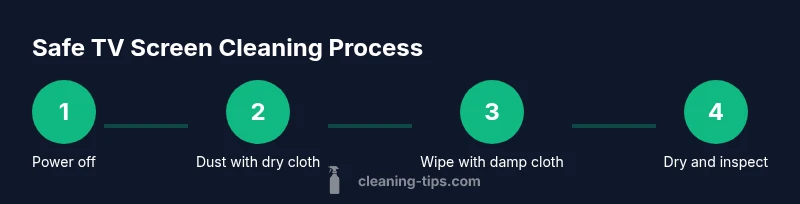
A safe cleaning routine centers on minimal moisture and gentle motion. Begin by powering down and unplugging the TV to prevent any electrical hazard. Wipe away loose dust with a dry microfiber, moving in gentle strokes. Lightly dampen a clean microfiber cloth with distilled water or a screen-safe cleaner, then wipe the screen in a consistent pattern—top to bottom or circular motions—without applying pressure. Finally, dry with a separate dry microfiber to remove any remaining moisture. Do not spray liquids directly onto the screen; mist onto the cloth as needed.
How to Use Water and a Microfiber Cloth Properly
Distilled water is preferred because it avoids mineral deposits that can leave spots. Use a microfiber cloth that is soft and lint-free; fold it to use clean sides as you go. Lightly dampen the cloth—just enough to remove smudges, never soak it. Wipe with even pressure in straight lines or gentle circular motions, avoiding corners where liquid can pool. If stubborn smudges persist, apply a tiny amount of cleaner labeled safe for screens to the cloth and retry; never apply liquid directly to the screen.
Common Mistakes That Damage Displays
Avoid spraying cleaners directly onto the screen; spraying can allow liquid to seep into seams and damage circuitry. Do not use ammonia-based products like Windex or high-alcohol solutions, which can degrade coatings and cause halos. Don’t press hard or scrub aggressively; screens are sensitive to pressure and micro-scratches. Never use abrasive materials, paper towels, or rough cloths that can scratch the surface. Finally, don’t rush the drying process—let the screen air-dry completely before powering the TV back on.
Case Studies: LCD vs OLED vs Plasma Cleaning Nuances
LCD and LED screens share similar coatings but may respond differently when solvents are introduced. OLED panels have ultra-thin organic layers that can be particularly susceptible to residue or chemical exposure, so extra caution is warranted. Plasma displays, though less common now, were even more sensitive to liquids near circuitry. Across these technologies, the safest approach remains a dry, gentle method with a minimal damp cloth and screen-safe products when necessary.
Residue Troubleshooting: What if You Already Used Windex?
If you suspect residue or streaks after using an improper cleaner, power the unit off and unplug it to inspect the surface with bright light. Gently re-wipe with a lightly dampened microfiber cloth using distilled water, then dry with a separate cloth. For stubborn haziness, a very small amount of a screen-safe cleaner on a cloth can help—but ensure the product is explicitly labeled safe for electronics and test on a small area first. If problems persist, consult the manufacturer or a professional technician.
Safety, Warranty, and Longevity Considerations
Using non-approved cleaners can potentially void warranties if damage occurs due to chemical exposure. Following the manufacturer’s cleaning guidelines lowers risk and maintains warranty eligibility. Always keep liquids away from power connections and unplug devices during cleaning. Regular, careful maintenance—dusting with a dry microfiber and minimal moisture—extends the life of your display while preserving image quality.
Quick Recap: Safe Practices at a Glance
- Use a microfiber cloth and distilled water as the default approach.
- Avoid Windex, ammonia, and high-alcohol cleaners on TVs.
- Never spray liquids directly on the screen; apply to the cloth first.
- Power off and unplug before cleaning; let surfaces dry completely before use.
- Test products on a small area before broader application.
AUTHORITY SOURCES
- https://www.nist.gov
- https://www.cdc.gov
- https://www.consumerreports.org
Tools & Materials
- Microfiber cloth (soft, lint-free)(Use a fresh section for each wipe; avoid rough textiles that can scratch.)
- Distilled water(Avoid tap water to prevent mineral deposits.)
- Screen-safe cleaner (optional)(Look for products labeled safe for LCD/LED screens; spray onto cloth, not onto screen.)
- Spray bottle (optional)(If using distilled water, a small spray bottle helps dampen cloth evenly.)
- Soft brush or air blower (optional)(Use to remove loose dust before wiping.)
Steps
Estimated time: 15-20 minutes
- 1
Power off and unplug the TV
Turn off the TV and unplug it to avoid any electrical risk while cleaning. This also prevents ghosting if moisture contacts internal components. Give the screen time to cool and stay dry during the process.
Tip: Even with power off, avoid touching internal components by keeping your hands away from vents and ports. - 2
Dust with a dry microfiber cloth
Gently wipe the screen surface to remove loose dust. Use light strokes and avoid circular scrubs that could push dirt into edges. This step minimizes moisture exposure later.
Tip: Keep the cloth flat and avoid folding to prevent additional pressure on the surface. - 3
Prepare a damp cloth with distilled water
Lightly dampen a clean microfiber cloth with distilled water or a screen-safe cleaner. Do not soak—excess liquid can seep into seams or the frame. Worry about streaks? A barely damp cloth reduces risk while still lifting oils.
Tip: If using a cleaner, spray it on the cloth, not directly on the screen; proof that you control moisture is key. - 4
Wipe the screen with controlled motions
Wipe in straight lines from top to bottom or in small circular motions, applying gentle pressure. Do not scrub; the goal is to lift oils without removing coatings. Stop if you notice resistance or unusual residue.
Tip: Work in sections to ensure even coverage and to avoid re-wetting a single area. - 5
Dry the surface completely
Use a dry microfiber cloth to remove any remaining moisture and ensure a streak-free finish. Allow a few minutes for any residual dampness to vanish before powering the TV back on.
Tip: Inspect under bright light and adjust technique if you see streaks—often caused by insufficient drying. - 6
Re-check and test
Power the TV back on and confirm the screen looks clear. If smudges persist, repeat the damp-dry cycle with minimal liquid and a new cloth section. Avoid repeating the process aggressively; repeated wet cleaning can be risky.
Tip: If you must repeat, pause to ensure full drying before re-energizing.
Questions & Answers
Is Windex safe for LCD/LED TVs or OLED panels?
No. Ammonia-based cleaners like Windex can degrade coatings on LCD, LED, and OLED displays. Use a microfiber cloth with distilled water or a screen-safe cleaner instead.
No—avoid Windex on TV screens. Use a microfiber cloth with distilled water or a screen-safe cleaner instead.
What should I use to clean a TV screen if not Windex?
Use a soft microfiber cloth lightly dampened with distilled water or a cleaner labeled safe for screens. Spray onto the cloth, not the screen, and wipe gently.
Use a microfiber cloth dampened with distilled water or a screen-safe cleaner. Do not spray directly onto the screen.
Can I spray water directly onto the screen to clean it?
No. Direct spraying can lead to moisture ingress into the device. Always apply liquid to the cloth first, then wipe the screen.
No—spray should never hit the screen directly. Always mist onto the cloth.
Will cleaning void the TV warranty?
Using non-approved cleaners can jeopardize warranty coverage if moisture or chemical damage occurs. Follow the manufacturer’s guidelines to minimize risk.
Using unapproved cleaners can affect warranty coverage; follow the manual for approved methods.
How often should I clean a TV screen?
Regular light cleaning as needed—dust weekly and wipe smudges as they appear. Avoid over-wetting and aggressive scrubbing.
Clean as needed to remove dust and smudges, but don’t overdo it.
Watch Video
The Essentials
- Avoid ammonia-based cleaners on TV screens.
- Use a microfiber cloth with distilled water as the default method.
- Never spray liquids directly onto the screen.
- Power off and unplug before cleaning.
- Test products on a small area first.