What Do You Use to Clean a TV Screen? A Safe, Simple Method
Learn safe, practical methods to clean a TV screen without damaging coatings. Discover what cleaners work, which tools to use, step-by-step instructions, and common mistakes to avoid for a spotless, glare-free display.


What do you use to clean a tv screen? The safe answer is simple: start with a dry microfiber cloth to remove dust, then wipe with a lightly damp microfiber cloth using distilled water or a 70% isopropyl alcohol solution diluted with water. Never spray cleaner directly on the screen, avoid ammonia-based cleaners, and unplug the TV first.
what do you use to clean a tv screen
In practice, what do you use to clean a tv screen should be answered with care. Modern displays are sensitive to liquids, scratches, and coatings, so the safest approach is simple and gentle. By starting with dust removal and finishing with a dry inspection, you protect your investment and enjoy clear picture quality for years. Cleaning Tips emphasizes the importance of using minimal moisture and avoiding harsh chemicals. This guidance aligns with best practices from Cleaning Tips analysis, which notes that improper cleaners can degrade anti-glare and coating finishes over time.
When you consider what do you use to clean a tv screen, think protection first: the goal is to remove dust and fingerprints without introducing moisture that can seep behind seals or into speaker grilles. The simplest and most universal rule is to work with the gentlest method that yields a clean surface. If your screen is only lightly soiled, a dry microfiber cloth may be enough; for smudges and fingerprints, move to a damp cloth with a safe solution. The emphasis is on testing first and cleaning in small sections to avoid streaks or液 leaks that could affect display performance.
Safe cleaning agents for TV screens
Selecting the right cleaning agents is essential to preserving screen coatings and image quality. The safest approach is to use mild, screen-safe solutions and to avoid any cleaner that contains ammonia, vinegar, or harsh solvents. Distilled water is a reliable base for dampening cloths, because it minimizes mineral residue that can appear as specks after drying. For fingerprints and oily smudges, a 70% isopropyl alcohol solution can be used sparingly when diluted with distilled water (for example, a 1:1 ratio). Do not spray liquids directly onto the screen; misting a cloth is preferable to minimize liquid contact with seams. Manufacturer guidelines should always be consulted, and if in doubt, opt for plain water and a microfiber cloth. The Cleaning Tips team notes that coatings on newer TVs are more delicate than older models, reinforcing the need for restraint and patience when selecting cleaners.
Avoid cleaners designed for glass or windows, which can contain chemicals that damage anti-glare coatings or cause clouding. Some multi-surface wipes may seem convenient, but they often include additives that aren’t intended for display surfaces. If your TV’s user manual lists approved cleaners, follow that guidance closely. For most households, distilled water plus a soft microfiber cloth is sufficient for routine cleaning, with diluted alcohol reserved for stubborn smudges only if recommended by the manufacturer.
Tools and setup
Before you begin, assemble a small kit of tools and materials to keep the process smooth and safe. The aim is to minimize moisture exposure and to avoid aggressive scrubbing. Gather a dry microfiber cloth, a second microfiber cloth for dampening, distilled water, and optional isopropyl alcohol (70%) for tougher spots. If you prefer not to mix solutions, a manufacturer-approved screen cleaner can be used, but only if explicitly recommended. A soft brush or air blower can help remove dust from around ports and edges without rubbing particles into the screen. Ensure the TV is powered down and unplugged from the wall to eliminate any risk of electric shock or static discharge. Finally, work in a well-lit area so you can spot smudges and streaks as you work. The Cleaning Tips approach emphasizes testing any new technique on a small, inconspicuous area first to prevent accidental damage.
This setup minimizes risk and supports high-quality results while staying within safe cleaning boundaries. Remember that the goal is a spotless screen without any moisture pooling on the surface, which can travel along the edges and potentially seep into internal components.
Step-by-step cleaning process
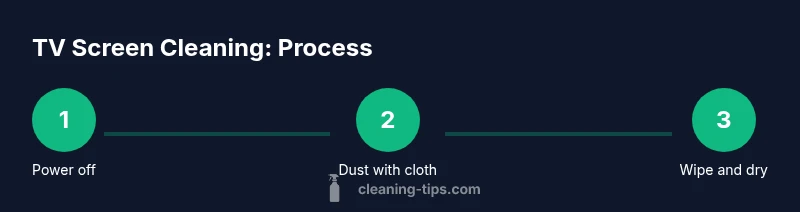
Cleaning a TV screen involves a sequence of careful steps designed to remove dust, fingerprints, and smudges without harming coatings. While this section details the process, you will also find a structured step-by-step block later in the article for quick reference. Begin by turning off the TV and unplugging it to ensure there is no power flow or heat buildup during cleaning. Next, use a dry microfiber cloth to gently lift loose dust from the screen surface, working in circular motions or straight strokes with light pressure.
If fingerprints persist, lightly dampen a second microfiber cloth with distilled water or a 1:1 solution of distilled water and isopropyl alcohol. Wring the cloth well so it is damp, not wet, and wipe the screen using gentle, even strokes. Do not apply liquid directly to the screen—mist the cloth or dampen it first. After wiping, go over the screen once more with a dry microfiber cloth to remove any residual moisture and prevent streaking. Finally, inspect the surface under bright light to confirm even cleanliness and ensure there are no damp patches around the edges. This approach minimizes risk while delivering a clear, glare-free display.
If your TV has a coating or anti-reflective layer, avoid aggressive scrubbing or rough cloths to prevent micro-scratches. For stubborn fingerprints near the corners, use a very soft touch and consider a manufacturer-approved wipe that is labeled safe for coatings. Cleaning Tips recommends patience and a light touch as the most reliable combination for preserving your screen’s appearance over time.
Safety reminders and common mistakes
Even small mistakes can leave visible marks or damage sensitive coatings. The most common errors are spraying liquids directly onto the screen, using ammonia-based cleaners, and applying too much liquid that can run into seams. To avoid these issues, always apply liquid to a cloth rather than to the screen, and use only distilled water or a manufacturer-approved solution. Do not use household cleaners designed for glass, wood, or metal on a TV screen. Additionally, never rub aggressively or use abrasive pads that can scratch the surface. If the screen displays unusual discoloration, fogging, or persistent damage signs, discontinue cleaning and consult the manufacturer’s support resources. The Cleaning Tips team highlights that a cautious approach—paired with high-quality microfiber and minimal moisture—delivers the best long-term results.
Maintaining your screen over time
Maintenance is about routine care and careful handling to preserve the screen’s coatings and brightness. Clean the screen when you notice fingerprints or dust; avoid waiting until smudges become permanent. Schedule gentle wipe-downs every few weeks for frequently used TVs, especially in rooms with dustier air or high humidity. Keep your cleaning kit in a designated spot to prevent cross-contamination with household cleaners. If your TV is mounted or placed in a high-traffic area, consider a soft microfiber sleeve to protect the screen from accidental contact. The Cleaning Tips analysis indicates that consistent care reduces the need for more aggressive cleaning and prolongs screen life. By establishing a simple routine, homeowners and renters can maintain a pristine viewing experience without risking damage to delicate coatings.
Tools & Materials
- Microfiber cloth (lint-free, non-abrasive)(Use dry for dusting; also works dampened for smudges)
- Distilled water(Minimize mineral residue on finish and anti-glare coatings)
- Isopropyl alcohol (70%)(Dilute 1:1 with distilled water if needed for tough smudges)
- Spray bottle (optional)(Mist cloth lightly; never spray directly on screen)
- Soft-bristled brush or dust blower (optional)(Remove dust from edges and ports without rubbing)
Steps
Estimated time: 10-15 minutes
- 1
Power down and unplug
Turn off the TV and unplug it from the wall to eliminate any risk of electric shock and to prevent moisture from running into internal components. This also reduces the chance of static buildup while you wipe. Keep the TV unplugged until the screen is completely dry before reconnecting power.
Tip: Always start with safety—unplug the power before touching the screen. - 2
Dust the screen surface
Use a dry microfiber cloth to remove loose dust. Light, even strokes work best; avoid circular scrubbing that can push dust into tiny crevices. If dust stubbornly clings near the corners, tilt the screen slightly to let gravity help remove it.
Tip: Dry dusting reduces moisture exposure and minimizes streaks. - 3
Prepare your cleaning solution
If you need more than dusting, prepare a damp cloth by misting it with distilled water or a 1:1 distilled water to isopropyl alcohol mix. Do not pour liquid directly onto the screen, and ensure the cloth is barely damp to prevent seepage behind the display.
Tip: Keep the cloth just damp, not wet, to avoid liquid running into edges. - 4
Wipe the screen gently
Wipe the screen with smooth, even strokes. Start in the center and move outward, ensuring any moisture stays on the surface and does not pool along the edges. Use less pressure for coatings and edge areas which are more susceptible to wear.
Tip: Avoid heavy pressure that could scratch or wear anti-glare coatings. - 5
Dry and inspect for streaks
Use a dry microfiber cloth to remove any remaining moisture. Inspect the screen under bright light for streaks or smudges; if needed, repeat the damp wipe and dry pass on affected areas.
Tip: A second pass often removes remaining fingerprints without rubbing. - 6
Clean edges and vents
Gently wipe the frame and any non-screen surfaces around the display with a separate cloth to prevent residual moisture from spreading to the screen during reassembly or mounting.
Tip: Keep liquids away from speaker grills and ports.
Questions & Answers
Can I use water alone to clean a TV screen?
Water can remove dust, but fingerprints and oils may require a mild cleaning solution. Use distilled water with a microfiber cloth and test first on a small area.
Water can help with dust, but for fingerprints you’ll want a mild solution. Start with distilled water and a microfiber cloth, and test on a small area first.
Is it safe to use 70% isopropyl alcohol on LCD/LED screens?
When diluted with distilled water and used sparingly, 70% isopropyl alcohol can be safe for many screens. Always check your manufacturer’s guidelines and avoid direct spraying.
Yes, if diluted and used sparingly, but always check your screen’s manual and never spray directly.
Should I unplug the TV before cleaning?
Yes. Unplugging removes the risk of electric shock and helps prevent any moisture from contacting live circuits.
Yes—unplug before cleaning to stay safe and protect the TV.
Can I use vinegar or window cleaners on a TV screen?
No. Vinegar and ammonia-based cleaners can damage anti-reflective coatings and may leave streaks or clouding.
No—avoid vinegar or window cleaners to protect the screen coatings.
What about the screen’s anti-glare coating?
Handle with extra care; use minimal moisture and avoid abrasive pads to prevent scratching the coating.
Be gentle with the anti-glare coating and avoid aggressive scrubbing.
Watch Video
The Essentials
- Unplug before cleaning to ensure safety and avoid damage
- Use the gentlest method—dry cloth first, then a barely damp cloth if needed
- Avoid ammonia, vinegar, or window cleaners that can harm coatings
- Test on a hidden spot and inspect under bright light for streaks