How to Clean Mass Air Sensor: A Practical Guide for Vehicles
Learn a safe, step-by-step method to clean your mass air flow (MAF) sensor. This practical guide covers tools, safety tips, and testing to restore engine performance and fuel efficiency.


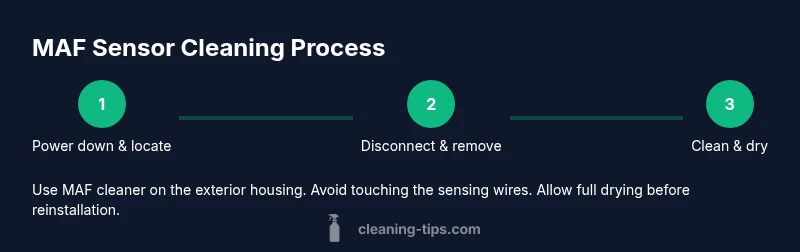
To clean a mass air sensor, remove the sensor from the intake, spray it with a dedicated MAF cleaner, and wipe away contaminants without brushing the delicate filaments. Allow it to dry completely before reinstalling, reconnecting the harness, and starting the engine. This DIY task can restore smooth idle and improve fuel economy when done carefully.
Why cleaning a mass air sensor matters
The mass air flow (MAF) sensor is a critical part of modern engines. It measures the amount of air entering the intake so the engine control unit can mix the right fuel amount. Over time, dirt, oil vapor, and dust can coat the sensing elements, causing erroneous readings, rough idle, and reduced fuel economy. According to Cleaning Tips, regular inspection and cleaning of the MAF sensor is a simple, effective maintenance step that can prevent performance issues and costly repairs.
Keep in mind that cheap or aggressive cleaners can leave residues or damage the hot film elements. Use only a purpose-made MAF sensor cleaner and avoid touching the sensing wires. Before starting, consult your vehicle's service manual for sensor location and removal procedures. This guide focuses on the steps most home maintenance enthusiasts can perform without specialized tools. If your vehicle has a complex intake system or you see signs of physical damage, seek professional service.
How the mass air sensor works and what can go wrong
A MAF sensor measures the mass of incoming air to help the engine computer calculate fuel delivery. When the path is blocked by dirt, oil film, or humidity, readings drift toward too rich or too lean. Symptoms of a dirty MAF sensor include rough idle, hesitation during acceleration, poor fuel economy, stalling, and check engine light codes such as P0101/P0102 in many vehicles. Regular cleaning reduces contaminants and can restore more accurate readings, which in turn stabilizes idle and improves throttle response. Cleaning Tips analysis shows that many owners notice a noticeable uptick in performance after a proper MAF sensor clean.
What you’ll need: tools, cleaners, and safety gear
Stock up on a dedicated MAF sensor cleaner, a clean microfiber cloth, and basic hand tools. You’ll also want gloves and eye protection, plus a clean work surface. Having these items ready reduces the risk of damage during sensor removal and ensures you can complete the job in one sitting.
Step-by-step overview (high-level)
The cleaning process involves safely removing the sensor, inspecting it for visible damage, applying the cleaner to dissolve grime, allowing drying time, reinstalling, and verifying operation. This overview sets the stage for the detailed steps that follow and helps you plan a 30–45 minute maintenance session depending on your vehicle’s configuration.
Safety and best practices
Always disconnect the battery ground before starting to avoid short circuits. Use only the manufacturer-recommended MAF cleaner; do not use carburetor or brake cleaner, which can leave residues or cause damage. Handle the sensor gently—the hot film elements are fragile. Work in a well-ventilated area and keep the sensor away from oils, solvents, and direct contaminants. If you notice physical damage to wiring or the sensor body, stop and consult a professional.
Aftercare and testing: confirming success
After reinstalling, start the engine and listen for a smooth idle. If you have an OBD-II scanner, clear any stored codes and run a quick drive to ensure the check engine light does not return. For many vehicles, you’ll notice improved idle stability and throttle response within a short test drive. If codes persist, recheck the sensor seating and electrical connections, and verify the air intake is clean and free of vacuum leaks.
Common mistakes and troubleshooting
Common errors include using the wrong cleaner, rubbing or brushing the sensor, or touching the sensing element. Over-wetting the sensor or letting cleaner pools remain on the film can cause slow drying or residue. If the connector pins look corroded or bent, replace them rather than forcing a snug fit. For stubborn grime, repeat the cleaning step after allowing extra drying time, but do not overspray.
Maintenance mindset: when and how often to clean
Most vehicles benefit from inspecting the MAF sensor every 30,000–50,000 miles, or if you notice performance changes. If you drive in dusty or humid conditions, you might inspect and clean sooner. Document your maintenance, noting the date and any codes observed. Keeping a simple log helps you track sensor health and schedule future service.
Tools & Materials
- MAF sensor cleaner(Use a dedicated spray designed for mass air sensors; avoid solvents that can damage the sensor.)
- Microfiber cloth(Lint-free for safe wiping of grime without residue.)
- Screwdriver or socket set(Needed to remove mounting screws and access the sensor.)
- Safety gloves(Keep hands clean and protect from cleaners.)
- Safety goggles(Eye protection in case of spray splatter.)
- Rag or paper towels(Extra cleanup on the workbench.)
- Shop vacuum or compressed air (optional)(Used to gently remove dust around the sensor area without touching the element.)
Steps
Estimated time: 30-45 minutes
- 1
Power off and locate the sensor
Turn off the engine and disconnect the battery ground to prevent shorts. Locate the mass air sensor in the intake tract as described in your manual, typically between the air filter housing and the throttle body.
Tip: Take a photo of the wiring harness before disconnecting to ensure correct reconnection. - 2
Disconnect the sensor safely
Unplug the electrical connector and remove any screws or clamps holding the sensor in place. Keep screws in a small tray to avoid losing them.
Tip: Handle the sensor by its plastic body, not by the delicate sensing element. - 3
Inspect visually for damage
Check for signs of physical damage, melted plastic, or frayed wiring. If you see visible damage, do not attempt cleaning—replace the sensor.
Tip: If there’s any doubt about the condition, proceed with caution and consult a professional. - 4
Spray the cleaner on the sensor
Spray a light mist of MAF cleaner onto the exterior housing and around the opening. Do not spray directly onto the sensing element.
Tip: Keep the sensor stationary to avoid bending delicate components. - 5
Wipe away grime with a cloth
Gently wipe away grime with a clean microfiber cloth. Avoid applying pressure that can damage the sensor wires or film.
Tip: If stubborn grime remains, repeat the spray-and-wipe step after a short dry-down. - 6
Dry completely before reinstallation
Let the sensor air-dry for several minutes until no solvent scent remains, then ensure all surfaces are dry before reinstalling.
Tip: Direct sunlight or heat sources can accelerate drying but avoid high heat that may warp components. - 7
Reinstall and reconnect
Reconnect the harness, secure the sensor with screws, and reinstall any intake components you removed.
Tip: Double-check that all clamps and hoses are seated firmly to prevent leaks. - 8
Test engine and clear codes
Reconnect the battery, start the engine, and listen for smooth operation. If you have an OBD scanner, clear codes and run a quick drive to confirm results.
Tip: If the check engine light returns, recheck connections or consult a professional.
Questions & Answers
What is a mass air sensor and why clean it?
The mass air flow sensor measures incoming air to help the engine compute fuel delivery. Cleaning removes grime that can cause inaccurate readings, helping idle stability and fuel efficiency.
A MAF sensor measures air entering the engine. Cleaning it helps keep readings accurate, which improves idle and fuel economy.
Can I use carb or brake cleaner on a MAF sensor?
No. Use a dedicated MAF sensor cleaner; other solvents can damage the sensor’s delicate elements and leave residues that worsen readings.
Avoid carb or brake cleaners on a MAF sensor. They can damage it; use MAF cleaner instead.
How often should I clean my MAF sensor?
Inspect the sensor during regular maintenance and clean if you notice symptoms like rough idle or poor acceleration. In dusty conditions, consider more frequent checks.
Check it during routine maintenance and clean if you notice performance issues; dusty conditions may require more frequent checks.
What are signs of a dirty MAF sensor?
Symptoms include rough idle, hesitation on acceleration, reduced fuel economy, and occasional stalling. A diagnostic code may indicate a MAF fault.
Rough idle, sluggish acceleration, and reduced fuel economy can point to a dirty MAF sensor.
Is it safe to clean the sensor while the engine is warm?
It’s safer to clean after the engine has cooled to avoid burns and to prevent rapid solvent evaporation that could affect cleaning.
Let the engine cool before cleaning to stay safe and to allow solvents to work without drying too fast.
Should I replace the sensor if it’s damaged?
Yes. If you observe physical damage, frayed wiring, or persistent fault codes after cleaning, replacement is recommended.
If there’s visible damage or persistent faults after cleaning, replacement is advised.
Watch Video
The Essentials
- Disconnect power before starting to avoid shorts
- Use only MAF-specific cleaner
- Handle sensor carefully to protect the sensing element
- Dry completely before reinstallation
- Test drive to confirm improved idle and throttle response