How to Clean Battery Corrosion Safely: Step-by-Step Guide
Learn safe, practical steps to clean battery corrosion on terminals and components. This guide covers PPE, neutralizing acids, proper rinsing, and when to replace batteries.


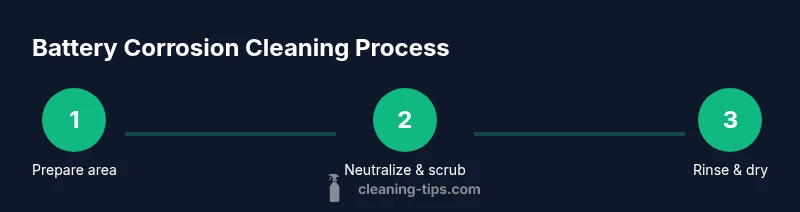
Goal: safely remove corrosion from battery terminals and connectors without damaging the battery or creating hazards. Begin by turning off and disconnecting power, wearing eye protection and gloves. Neutralize any acid with a baking soda solution, then scrub gently with a non-metal brush. Rinse and dry before reconnecting, and replace if damage is severe.
What is Battery Corrosion and Why It Happens
Battery corrosion refers to the white, blue-gray crust that forms on the terminals and connectors when chemical reactions inside the battery break down electrolyte and react with metals. It is most common on flooded lead-acid batteries found in cars, trucks, and some backup power systems. The crust is usually composed of metal sulfates and oxides and can impede current flow, create heat during charging, and accelerate wear on clamps and posts. When you set out to clean battery corrosion, you’re restoring a clean contact surface so power can pass efficiently and safely. The Cleaning Tips team notes that prevention—by keeping connections tight, applying dielectric grease, and storing batteries in a dry environment—dramatically reduces recurrence and prolongs lifespan.
Safety First: Protect Yourself Before You Clean
Before touching any battery, switch off equipment and disconnect power from the device or vehicle. Wear PPE: safety goggles to protect eyes from splashes, chemical-resistant gloves, and a long-sleeve shirt. Work in a well-ventilated area to avoid fumes and avoid metal jewelry that could create short circuits. Keep a container of baking soda and water nearby to neutralize acids, and have a clean cloth or paper towels to absorb spills. If the battery is on its side or damaged, evacuate and seek professional assistance; damaged batteries can leak dangerous electrolyte. The goal is to minimize skin contact and inhalation risk while maintaining clean hands and tools.
Battery Types and Severity: Do I Clean or Replace?
Not all batteries respond to cleaning the same way. Flooded lead-acid batteries, common in vehicles and some UPS units, can tolerate terminal cleaning when corrosion is light to moderate. Sealed or lithium-ion packs, however, are not designed for terminal meddling; attempting to clean exposed cells can cause internal short circuits or thermal events. If you see cracks in the casing, swollen terminals, or widespread pitting, cleaning is not a safe solution—replacement is usually the safer choice. For any battery, if you notice bubbling, strong fumes, or electrolyte leaks, stop and seek professional service. In short, cleaning is suitable for surface corrosion on accessible metal terminals, not for compromised or advanced damage.
Cleaning Methods: Neutralizing, Scrubbing, and Rinsing
Neutralizing the acid is the first step. A mild baking soda paste (baking soda mixed with a small amount of water) is brushed onto the corroded areas to neutralize the acid residues before scrubbing. Use a nylon brush or old toothbrush to scrub gently; avoid metal tools that can gouge metal posts. After scrubbing, rinse with distilled water to remove residue. Dry all surfaces thoroughly with a clean cloth and allow them to air-dry completely before reconnecting. Do not reuse old rags that leave fibers or residues behind. For safety, never splash liquids onto hot surfaces.
Practical Setup and Workspace
Prepare the workspace: work on a non-conductive surface, with ventilation. Place towels to catch spills and a tray to hold removed bolts or clamps. Keep baking soda on hand and a bucket for rinsing water. Ensure the device is off and unplugged, with the negative terminal disconnected first to reduce risk of short circuits. If you’re cleaning in a garage, keep a fire extinguisher nearby just in case.
Aftercare and Prevention
Once clean and dry, inspect the clamps for wear and apply dielectric grease to reduce future corrosion. Reconnect the terminals in the correct order and torque to the original spec using a wrench, if possible. Start the device and observe for hesitation or unusual smells; if symptoms return, stop and re-check. Store batteries in a dry place and maintain a consistent charge level to ward off future buildup.
When to Replace and What to Do Next
Significant corrosion that cannot be thoroughly cleaned, or any signs of damage like cracks, bulges, or leaking electrolyte, indicates replacement is the safer choice. If the battery is old, or performance remains poor after cleaning, consider replacement rather than repeated cleaning. Consult a professional for a battery health check if you rely on the device for critical power.
Common Mistakes to Avoid
Common mistakes include using metal tools on terminals, using acidic cleaners, or ignoring signs of damage. Avoid using household cleaners that leave residues; opt for plain water and baking soda. Don’t overspray onto other electronics or sensitive components. And never attempt to charge a damaged battery—charging compromised cells can lead to fire or leakage.
Extending Battery Life Through Better Maintenance
Regular inspection of terminal cleanliness, tightening clamps, and keeping corrosion-inhibiting grease applied after cleaning can extend life. Schedule periodic checks for vehicles and backup power systems, especially in humid environments or places with corrosive air. Keep electrolyte levels in the correct range in flooded batteries and ensure proper storage when not in use.
Tools & Materials
- Safety goggles(Protects eyes from splashes and particles)
- Chemical-resistant gloves(Avoid latex or porous gloves; nitrile recommended)
- Long-sleeve shirt or coveralls(Minimize skin exposure to fluids)
- Non-metal brush (nylon or nylon-trimmed toothbrush)(Used to scrub without scratching metal)
- Baking soda(Neutralizes acid residues on contact surfaces)
- Water container or spray bottle (distilled preferred)(Rinses residues; distilled is best to avoid minerals)
- Towels or rags(Catches spills and dries surfaces)
- Wrench or nut driver(Loosens terminals and clamps safely)
- Plastic tray or sealable bag(To store removed components and prevent spills)
- Ventilated area (garage with door open, or outdoors)(Keeps fumes at safe levels)
Steps
Estimated time: 20-40 minutes
- 1
Prepare area and safety gear
Set up a clean, ventilated workspace and place absorbent towels on a non-conductive surface. Put on safety goggles, gloves, and a long-sleeve shirt. This protects against chemical splashes and dust.
Tip: PPE reduces exposure risk; keep a damp cloth handy to wipe spills. - 2
Disconnect the battery safely
Power down the device or vehicle and disconnect the negative terminal first to minimize sparks. Then remove the positive terminal and keep them separated from each other.
Tip: Reversing steps can cause arcing; always disconnect in the correct order. - 3
Neutralize corrosion with baking soda paste
Apply a paste of baking soda and a small amount of water to corroded areas to neutralize acids before scrubbing.
Tip: Neutralization reduces acidity and makes scrubbing safer. - 4
Gently scrub terminals and clamps
Scrub with a nylon brush, focusing on the metal surface and posts until the area looks clean. Avoid metal tools that could scratch or short.
Tip: Scrubbing too hard can damage posts; aim for bright metal and no crust. - 5
Rinse with distilled water and dry completely
Rinse residues with distilled water to remove baking soda; dry all parts thoroughly with a clean cloth and allow to air-dry before reconnecting.
Tip: Residual moisture can cause renewed corrosion. - 6
Reconnect, test, and monitor
Reconnect in the correct order, power up, and observe for smooth operation. Check for any signs of lingering corrosion over the next few hours.
Tip: If corrosion returns quickly, seek professional help.
Questions & Answers
Is it safe to clean battery corrosion yourself?
Yes, with proper PPE and precautions. Avoid cleaning severely damaged batteries and seek professional help if you notice cracks, leaks, or swelling.
Yes—if you wear protection and the battery isn’t damaged; stop if you see cracks or leaks.
Can I use vinegar to clean battery terminals?
Vinegar is acidic and can worsen corrosion or damage terminals, so it’s not recommended for cleaning battery corrosion.
Vinegar isn’t recommended; it can cause more harm than good.
When should I replace a battery instead of cleaning?
Replace if there are cracks, leaks, swelling, heavy corrosion, or persistent poor performance after cleaning.
Replace if you see damage or poor performance after cleaning.
Is baking soda safe for all battery types?
Baking soda is generally used for flooded lead-acid batteries. Do not use it on sealed or lithium-ion packs.
Not safe for every battery type; check the battery type before proceeding.
What maintenance reduces future corrosion?
Keep terminals clean and dry, apply dielectric grease, and ensure clamps are tight. Regular inspections help prevent buildup.
Keep things clean and dry, and check connections regularly.
What should I do if I see electrolyte on the battery?
Stop cleaning, install the battery in a safe area, ventilate, and seek professional help if leaks occur or fumes persist.
If electrolyte is present, stop and get professional help.
Watch Video
The Essentials
- Power down and protect yourself before cleaning
- Neutralize acids with baking soda, then scrub safely
- Rinse and dry thoroughly to prevent re-oxidation
- Reconnect and test, then monitor for recurrence
- Regular maintenance reduces future corrosion risk