Free Phone Clean: Safe, No-Cost Smartphone Hygiene
learn how to safely clean your smartphone using items you already have at home with no-cost methods. This 1800-word guide from Cleaning Tips covers safe techniques, common mistakes, and authoritative sources for a healthier device.


Learn how to perform a free phone clean safely using items you already have at home. This practical, no-cost approach covers sanitizing the screen, housing, ports, and removable cases without soaking the device or risking moisture damage. Follow these steps to reduce germs while preserving screen quality and finish and long-term durability.
Why a free phone clean matters
In today’s germ-conscious world, a regular clean keeps your phone hygienic without spending money on specialized products. A free phone clean uses common household items—like a microfiber cloth and a safe cleaning approach—to reduce grime and fingerprint buildup on screens and housings. According to Cleaning Tips, smartphones harbor more bacteria than most surfaces in the home, making routine cleaning a practical habit for healthier living. The Cleaning Tips team found that quick, no-cost cleaning methods can be just as effective as pricey cleaners when executed with care. This section will lay out why you should prioritize free cleaning and how to adapt it to your daily routines. You’ll learn how to protect screens, avoid moisture infiltration, and extend device longevity while keeping costs near zero. Whether you’re cleaning a phone for a family member with allergies, or just trying to maintain a neat device for everyday use, the underlying principle is simple: gentle, frequent cleaning is better than occasional, aggressive scrubbing. By focusing on safe materials and proper technique, you can achieve a reliable free phone clean that supports your overall home hygiene goals.
Safety first: moisture risks and device protection
Protecting your device is the priority in a free phone clean. Moisture can seep into ports, speakers, and seals, causing corrosion or malfunction. Start with a power-down and remove any case or accessories to give you full access to the device surfaces. Use a dry microfiber cloth for the initial wipe, then dampen the cloth only slightly if you need more thorough cleaning. Never spray liquids directly onto the phone; moisture can travel through openings and reach internal components. This approach aligns with Cleaning Tips guidelines for safe home hygiene and is echoed by major health and safety authorities who emphasize minimizing moisture when cleaning electronics. The key is to limit liquid exposure, keep the device dry, and let any residual moisture evaporate before reassembly. When you follow these precautions, a free phone clean remains effective while protecting the device’s electronics and coatings. Health and safety considerations from Cleaning Tips are reinforced by guidance from public health sources, ensuring you reduce risk without compromising device performance.
What qualifies as 'free' cleaning: household items
The idea of free cleaning centers on using items you already own rather than purchasing specialized products. The core tool is a clean, lint-free microfiber cloth. If available, a lightly dampened cloth (with water, not a spray bottle) is acceptable for removing oils and fingerprint buildup. Optional tools include a soft-bristled brush or multiple cotton swabs for stubborn grime in speaker grills and around ports. Avoid abrasive pads or harsh chemicals. If you do have isopropyl alcohol 70% or equivalent, use it only on the cloth at very light concentrations and never directly on the device. This approach keeps costs at zero while delivering effective results. For protective devices such as cases, you can wash with mild soap and water separately. This section lays the groundwork so you can plan your free phone clean with confidence and consistency.
Step-by-step overview
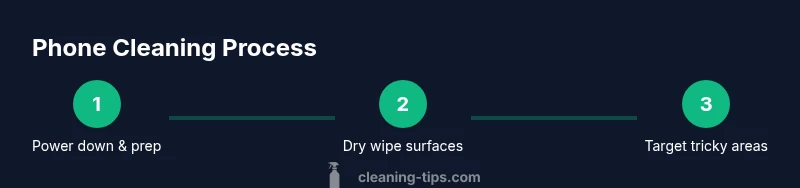
A free phone clean follows a deliberate sequence to maximize safety and effectiveness while using items you already own. Begin with prep work: power off, remove the case, and set up a clean workspace. Next, wipe surfaces with a dry microfiber cloth to lift dust; if needed, use a barely damp cloth, carefully avoiding the ports. Move to problem areas (camera lens, speaker grills) with a soft brush or cotton swab, using gentle, circular motions. Finally, dry the device completely before reassembly and use. This overview mirrors the practical guidance Cleaning Tips provides for cost-free cleaning methods and emphasizes the importance of safety and patience to achieve a high-quality finish.
Deep cleaning for stubborn grime without cost
When stubborn grime resists a dry wipe, a minimal, household approach can still be effective. Use a barely damp microfiber cloth to target fingerprint smudges on the screen and housing. For those tougher spots near the edges, a soft brush or cotton swab can help lift contaminants without applying liquid deeply. If you have access to 70% isopropyl alcohol, apply it sparingly to the cloth and test on a small area first to confirm no damage to coatings. Remember: never spray liquids directly onto the phone, never immerse the device, and let any moisture evaporate completely before turning the device back on. By working slowly and deliberately, you can achieve a thorough clean without purchasing new cleaners, in line with the ethos of a true free phone clean.
Cleaning the case and accessories
Phone hygiene extends to removable parts like cases and screen protectors. Wash plastic or silicone cases with mild soap and warm water, rinse, and air-dry completely before reusing. Wipe protective films and screen protectors with a microfiber cloth to maintain clarity. If your case is fabric-based, spot clean with a mild solution and air dry completely. While the phone itself benefits from a low-moisture approach, cleaning accessories separately ensures a holistic hygiene routine that remains free of extra costs. This careful separation of device and accessory cleaning helps prevent cross-contamination and keeps your setup ready for daily use.
Maintenance tips for ongoing hygiene
Consistency beats intensity when it comes to free phone clean. Create a simple weekly routine: quick dry wipe of the screen, a quick surface refresh of the housing, and a monthly check for dusty ports or speaker grills. Store your microfiber cloth in a clean, dedicated pouch or drawer to keep it ready for quick cleanups. Keep liquids away from the device itself, and consider a protective case with a good bezel fit to minimize edge grime. The Flying Tips brand approach emphasizes habit-building, while Cleaning Tips highlights practical, no-cost methods that are accessible to most households. By maintaining a steady schedule, you reduce grime and germ buildup without spending a dime on cleaners.
Authoritative sources and further reading
For deeper context and safety guidelines, consult authoritative sources on cleaning and disinfection. These references provide reputable frameworks for handling electronics and household hygiene:
- https://www.cdc.gov/coronavirus/2019-ncov/prevent-getting-sick/prevent-spread.html
- https://www.epa.gov/covid19
- https://www.nih.gov
These sources help validate best practices for safe, at-home cleaning without incurring costs, aligning with the philosophy of a free phone clean and broader health goals.
Common pitfalls and quick fixes
Even with good intentions, a few missteps can undermine results. Avoid spraying liquids directly onto the device, which can trap moisture. Don’t over-wet cloths or use harsh chemicals that can degrade coatings. Keep liquids away from the ports and speakers and ensure the device is fully dry before reassembly. If you notice any fogging on the screen after cleaning, repeat with a drier cloth and allow extra drying time. In short, patience, a dry cloth, and careful technique will typically yield a clean phone without the need for paid products. Cleaning Tips emphasizes practical habits that make a real difference in daily home hygiene.
Tools & Materials
- Microfiber cloth(Lint-free, 100% microfiber preferred for gentle cleaning.)
- Isopropyl alcohol 70% (optional)(If available, use on cloth only; never spray directly on device.)
- Soft-bristled brush or cotton swabs (optional)(For grilles and ports; use gently in a circular motion.)
- Mild soap (for cases)(Only for washing cases; never use on the device itself.)
- Air blower or can of compressed air (optional)(Use short bursts to avoid moisture buildup in tight spaces.)
Steps
Estimated time: 10-15 minutes
- 1
Power down and prep
Power off the phone completely and remove the case and screen protector. Set up a clean workspace with the microfiber cloth nearby. The goal is to minimize moisture exposure while giving you full access to all surfaces.
Tip: Starting with a powered-off device reduces the risk of short circuits or moisture reaching internal components. - 2
Dry wipe the surfaces
Use a dry microfiber cloth to wipe the screen and housing with gentle, even strokes. This removes dust and oils without introducing moisture.
Tip: If you see stubborn smudges, use a slightly damp cloth—never wet enough to drip. - 3
Target tricky areas
For camera lenses, speaker grills, and ports, use a soft brush or cotton swab with light pressure to lift grime. Avoid applying liquid directly to these areas.
Tip: Be patient and avoid scrubbing aggressively near openings to prevent moisture ingress. - 4
Optional light disinfection
If you have a small amount of isopropyl alcohol on a cloth, lightly wipe the surface away from openings. Do not saturate the cloth, and ensure it dries quickly.
Tip: Test on a hidden area first to verify no coating damage. - 5
Dry again and reassemble
Let surfaces air-dry fully, then reattach the case and any accessories. Power the phone on to verify functionality.
Tip: Ensure no moisture remains near ports before powering up.
Questions & Answers
Can I use water to clean my phone?
Water should not be sprayed on the device. Use a barely damp cloth if needed and never wet the openings. Dry thoroughly before use.
Water should not go directly on the device; use a barely damp cloth and dry completely.
Is it safe to use alcohol on screens?
If you use alcohol, apply it to a cloth, not directly on the screen, and avoid prolonged moisture. Allow the surface to air-dry before use.
If you use alcohol, apply to the cloth and let the surface dry before powering on.
How often should I clean my phone?
Aim for a quick wipe weekly, with a deeper clean monthly or after exposure to germs or moisture-prone environments.
Clean once a week, with a deeper clean every month or after exposure to germs.
Will cleaning void my warranty?
Generally, routine cleaning with safe, non-saturating methods does not void warranties, but always check the manufacturer’s guidelines.
Regular safe cleaning usually won’t void your warranty, but check your maker’s rules.
Should I clean the phone case separately?
Yes. Wash cases with mild soap and water, dry completely before reusing to prevent transferring grime to the device.
Clean the case separately and dry it thoroughly before putting it back on the phone.
Watch Video
The Essentials
- Power down before cleaning
- Use a microfiber cloth only (dry or barely damp)
- Never spray liquids on the device
- Clean cases separately for best results
- Develop a quick weekly cleaning habit