How to Clean Auto Battery Corrosion: Step-by-Step Guide
Learn how to safely clean auto battery corrosion on terminals, disconnect cables, apply a baking-soda paste, and protect connections. Practical, foolproof steps for homeowners and DIYers to prevent future buildup and keep starting reliable.


Learn how to safely remove battery corrosion from car terminals, restore a solid connection, and protect against future buildup. This how-to covers safety prep, the right cleaning agents, proper cable handling, and when to replace cables or the battery. Start by disconnecting the negative terminal, then inspect, clean, rinse, dry, and reconnect with dielectric grease.
Why Battery Corrosion Happens
Battery corrosion on vehicle terminals occurs when a chemical reaction between the battery acid and environmental moisture forms oxide or sulfate deposits on the terminals. Over time, these whitish or bluish crusts create higher resistance, reducing electrical flow and making the engine harder to start. In humid climates or during infrequent vehicle use, corrosion is more likely to develop. According to Cleaning Tips, corrosion on car battery terminals is a common maintenance issue for households. The Cleaning Tips team found that regular inspection and cleaning can prevent many startup problems and extend battery life by reducing resistance at the connection. By understanding these underlying mechanisms, you can setup a safer cleaning routine and identify warning signs before the problem worsens, such as increased surface crust, loose clamps, or sluggish engine response. This foundation helps you approach the task with confidence and a plan rather than guesswork.
Safety First: Prep and Precautions
Cleaning a car battery is a task that involves acids, electricity, and potential sparks. Start by ensuring the vehicle is off, the keys are out, and the engine is cool. Remove any jewelry, long sleeves, and eye protection to reduce the risk of burns or skin irritation. Work in a well-ventilated area away from open flames or sparks, and keep a dry cloth handy to wipe spills. Disconnect the negative terminal first, then the positive, using insulated tools if available. If you notice a crack, leak, or bulging battery, stop immediately and seek professional help. Never lean over the battery while loosening connections; hydrogen gas can accumulate and a spark could ignite it. After cleaning, reconnect the terminals in the correct order, applying dielectric grease to reduce future corrosion. This safety-focused approach protects you while you inspect and work on the battery.
Tools and Materials You’ll Need (and Why)
Having the right tools on hand makes a clean, safe process easier and faster. Core items are simple, readily available cleaning supplies and protective gear. You’ll want gloves and eye protection to shield skin and eyes from any acid or metal debris. A soft brush or old toothbrush helps scrub deposits without scratching metal parts. You’ll also need baking soda and water to neutralize acid; a small bowl or cup for mixing; a dry rag or towel to dry terminals; and dielectric grease or petroleum jelly to seal connections after cleaning. If the corrosion is stubborn, a plastic scraper can help loosen crust without damaging metal. Finally, keep a spray bottle of clean water for rinsing and a sealable bag for disposing of wipes and debris. With these items gathered, you’re ready to begin the cleanup with minimal risk and maximum control.
Step-by-Step Cleaning Process (Overview)
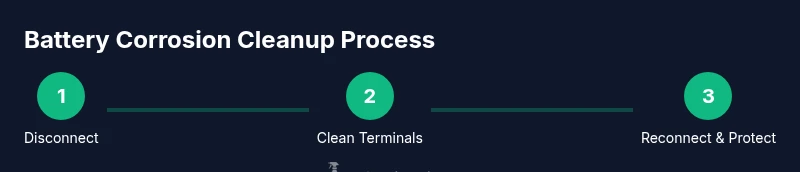
This guide follows a practical, safety-first approach. You’ll start with de-energizing the system by disconnecting the negative terminal, then inspecting the extent of corrosion. Next you’ll prepare a mild cleaning solution and apply it to the terminals, scrubbing gently to remove crust and residue. After scrubbing, you’ll rinse away the paste with a small amount of water, dry thoroughly, and apply a thin layer of dielectric grease to protect the metal from future oxidation. Finally, you’ll reconnect the terminals in the correct order and test the connection by attempting to start the vehicle or using a multimeter. Each action minimizes risk and preserves battery life. If you notice cracks, leaks, or significant damage, stop and seek professional help. This overview sets the stage for the detailed steps that follow in the dedicated Step-by-Step section.
Post-Clean Maintenance to Prevent Corrosion
Prevention is easier than repeated cleanings. After completing the cleaning, you’ll want to keep the terminals dry and free from moisture that can wick into the clamps. Applying dielectric grease or a lightweight petroleum jelly on the metal surfaces creates a barrier against moisture and corrosive vapors. Regularly inspect the battery area for signs of green, white, or blueish residue and tighten clamps as needed, but avoid over-tightening which can damage posts. If your vehicle sits unused for extended periods, consider a battery maintainer or trickle charger to keep the battery in good condition and reduce sulfation. Keep rubber boots and insulated connectors in good condition; replacing worn parts prevents future leaks. Finally, store cleaning materials in a closed cabinet away from heat and sunlight to maintain their effectiveness. A quick, routine check every 3-6 months can save you from bigger headaches down the road.
Troubleshooting Common Scenarios
Even with care, you may encounter stubborn crust or a lingering odor around the terminals. If the corrosion remains after cleaning, recheck that you removed all residue, and ensure both battery posts are properly tightened. A dull or sluggish engine start can indicate a weak connection or a failing battery; in this case, perform a basic electrical test or consult a professional. If you detect a fizzing sound or smell, stop immediately—the battery may be venting and should be inspected. Severe corrosion that extends to cables or clamps may require replacing the affected parts. If melting or melted insulation is observed, discontinue use and seek service. Finally, if you notice greenish corrosion on the battery terminal, this often indicates copper or brass components reacting with moisture and acidity and may require more intensive cleaning or part replacement. These scenarios help you decide whether DIY maintenance suffices or professional attention is needed.
When to Call a Professional
There are times when battery corrosion cleaning should be handled by a trained technician. If you find cracks, leaks, a swollen battery case, or corrosion that reaches the inside of the clamps, stop and call a pro. When the cables or terminals are heavily corroded beyond simple surface deposits, or if the battery cannot hold a charge after cleaning, professional testing and replacement may be required. In cold climates, corrosion can be worse due to condensation cycles, so it’s worth having a technician confirm that the battery and charging system are functioning properly. A professional can perform a load test, check alternator output, and determine whether the battery needs replacement or whether underlying electrical issues are present. The aim is to ensure safety and reliability without risking a breakdown on the road.
Real-Life Examples and Common Mistakes to Avoid
Here are a few practical scenarios and pitfalls to help you tidy up terminal corrosion more effectively. Do: work with a cool, dry battery in a ventilated area; use a plastic brush and a baking-soda paste; wear eye protection; check polarity before reconnecting; store rags and wipes securely. Don’t: use metal tools that could create a short, mix cleaners with fuel lines, spray water directly into the battery area without containment, or over-tighten clamps. Another common mistake is neglecting the battery housing; corrosion can indicate a larger problem such as a failing seal or cracked terminal cover. By learning from these real-life examples, you’ll improve your technique and increase your odds of a lasting repair rather than a temporary fix.
Tools & Materials
- insulated gloves(Nitrile or rubber gloves to protect skin)
- safety glasses(Impact-resistant eye protection)
- baking soda(Neutralizes acid; keeps a paste handy)
- water(Fresh or distilled for rinse)
- old toothbrush or soft brush(Gentle scrubbing without scratching metal)
- dielectric grease or petroleum jelly(Protects posts after cleaning)
- plastic scraper(For stubborn crust only)
- wrench or socket set (insulated if possible)(To loosen clamps safely)
- rag or towel(Drying and wiping spills)
- bowl or small container(Mix cleaning solution)
- spray bottle of clean water(Rinse away residues)
Steps
Estimated time: 25-45 minutes
- 1
Power down and disconnect the negative terminal
Park in a safe, ventilated area and turn off the engine. Remove jewelry and protective gear. Loosen the negative terminal clamp with an insulated tool and set it aside so it cannot contact the battery.
Tip: Always disconnect the negative terminal first to minimize the risk of a short. - 2
Inspect for corrosion and damage
Look for crusty white, gray, or blue deposits on the terminals and clamps. Note any loose connections, melted insulation, or exposed wiring. If damage is extensive, stop and consider professional service.
Tip: Document the extent of corrosion with a quick photo for reference. - 3
Mix cleaning solution
Prepare a baking soda paste by mixing baking soda with a small amount of water until it forms a thick paste. A diluted solution of baking soda and water can also be used for larger areas.
Tip: Do not use straight ammonia or bleach near the battery. - 4
Scrub the terminals and clamps
Apply the paste to the terminals and clamps. Scrub gently with a soft brush to remove deposits, focusing on the metal surfaces and inside the clamps. Avoid letting paste enter the battery housing.
Tip: Use plastic tools if you need extra leverage to loosen crust. - 5
Rinse and dry thoroughly
Rinse the area with a small amount of clean water to remove all paste. Dry completely with a clean towel before proceeding.
Tip: Drying completely prevents new moisture from initiating early corrosion. - 6
Reconnect and protect
Reconnect the negative terminal first, then the positive. Apply dielectric grease to the posts and clamps to form a moisture barrier.
Tip: Ensure clamps are snug but not over-tightened to avoid posts damage.
Questions & Answers
Is it safe to clean auto battery corrosion at home?
Yes, it is safe when you follow proper safety steps, wear protective gear, and work in a well-ventilated area. Avoid sparks and never touch battery casings with bare skin after cleaning. If you notice damage, seek professional help.
Yes, it is safe to clean at home if you follow safety steps and monitor for damage.
What causes battery terminal corrosion?
Corrosion typically results from a reaction between the battery acid, moisture, and air. This creates oxide or sulfate deposits at the terminals, increasing resistance and potentially causing starting problems.
Corrosion comes from chemical reactions at the terminals due to moisture and age.
Can baking soda damage the battery?
Baking soda is safe for cleaning when used as a paste or gentle solution and rinsed away. Avoid using concentrated cleaner or letting paste enter the battery housing.
Baking soda is safe in a paste form if you rinse it well and keep it away from the battery interior.
How often should I inspect battery terminals?
Check terminals every 3 to 6 months, especially in humid climates or if your vehicle sits unused for long periods. Look for new buildup and tighten clamps as needed.
Inspect terminals every few months and after long storage periods.
When should I replace battery cables?
Replace cables or clamps if you notice deep corrosion, damaged insulation, or a persistent poor connection after cleaning. A trained technician can test for underlying issues.
Replace cables if corrosion is severe or cleaning doesn’t restore a solid connection.
What should I avoid during cleaning?
Avoid bleach, ammonia, or other strong cleaners near the battery. Do not spray water directly into the battery housing and avoid metal tools that can cause shorts.
Don’t use harsh cleaners near the battery and avoid metal tools that could short it out.
Watch Video
The Essentials
- Inspect terminals regularly to catch corrosion early
- Use baking soda for safe, effective cleaning
- Protect cleaned terminals with dielectric grease
- Reconnect in the correct order to avoid shocks
- Seek professional help for damaged components