How to Clean Your Phone Safely: A Practical Guide
Learn how to safely clean your phone to remove oils, fingerprints, and grime without damaging screens or ports. This expert guide from Cleaning Tips covers tools, steps, and tips for a hygienic, well-maintained device.


To keep my phone clean and safe, power down the device, use a soft microfiber cloth, and avoid spraying liquids directly on the phone. This guide shows a safe, effective method to remove oils, fingerprints, and grime from screens, bodies, and cameras without risking moisture in openings. By following these steps, you’ll preserve display clarity, sensor accuracy, and overall hygiene.
Why keeping your phone clean matters
A clean phone isn’t just about appearance; it helps reduce the transfer of oils, fingerprints, and grime to your hands and surfaces. Regular cleaning also lowers the risk of build-up around sensitive areas such as the camera lenses and speaker grills. According to Cleaning Tips, adopting a simple, repeatable routine makes it easier to maintain a hygienic device without stressing about damage. For most households, a quick weekly wipe is enough to keep your phone looking and feeling fresh. When you choose to clean, do it with purpose, not as an afterthought. A well-kept device also mirrors the care you take with other tech and household surfaces, reinforcing a healthier home environment. This guide uses approachable language and practical steps so you can confidently keep my phone clean without guessing about safety or effectiveness.
Safe cleaning fundamentals
Before you touch the phone, power it down and unplug any accessories. Moisture should stay away from openings such as the charging port, SIM tray, speakers, and microphones. Use a lint-free microfiber cloth and, if needed, a small amount of distilled water or a 70% isopropyl alcohol solution applied to the cloth—not directly to the device. Never spray liquid directly onto the screen or body. Keep cleaners away from stickers and coatings that may wear off with aggressive solvents. Let the phone air-dry for a minute if you notice any dampness in crevices. This disciplined approach reduces risk of water intrusion and preserves screen sensitivity for a comfortable, reliable user experience.
Cleaning tools and safe products
The goal is gentle, non-abrasive cleaning. Essential items include a soft, microfiber cloth; distilled water for a mild dampening; and a small amount of isopropyl alcohol (70%) if disinfection is desired. Optional tools include cotton swabs for crevices and a soft brush for port rims. Avoid household cleaners containing ammonia, acetone, or vinegar on the screen that can strip coatings. If you use screen wipes, verify they are labeled safe for electronics. Labelled electronics-safe sprays can be used sparingly, but never spray directly on the device. Store cleaners away from children and pets.
Part-by-part cleaning overview
Think of cleaning in zones: screen and front, body and back, ports and speakers, and camera lenses. Start with the screen using a circular motion from the center outward, applying minimal moisture. Then wipe the body with light, even strokes. For ports and speaker grilles, use a dry cotton swab or brush to remove dust; never push moisture into openings. Finally, clean the lenses with a soft, clean microfiber cloth to avoid smudges. Complete this cycle once weekly or after heavy use. The approach prevents grime from migrating and keeps sensors responsive.
Maintenance tips for long-term cleanliness
Establish a quick daily wipe routine: a dry pass followed by a very light damp wipe every few days to reduce buildup. Use a dedicated case and keep your phone away from food, drinks, and greasy surfaces. Store your phone away from direct sunlight and heat sources that can warp screens or degrade coatings. Consider a monthly deeper clean if you have kids, pets, or frequent contact with dirty environments. If you notice persistent smudges or moisture around ports, pause and re-check your technique. A consistent regimen makes the task effortless and ensures your device stays hygienic and comfortable to use.
Troubleshooting common issues during cleaning
If smudges persist, double-check you used a barely damp cloth and not a soaked one. If you accidentally got liquid near a port, power off, remove the charger, and wait for any moisture to evaporate before trying again. For scratched coatings or screen discoloration after cleaning, stop and seek guidance rather than continuing harsh rubbing. If your phone has a glossy or anti-fingerprint coating, opt for gentler motions to avoid dulling the finish. Finally, if you routinely need heavy disinfection, reassess whether your device should be cleaned more often or with a different method that preserves coatings.
Tools & Materials
- Microfiber cloth (lint-free)(Use a soft, clean cloth to avoid scratches)
- Distilled water(For dampening cloth without minerals)
- Isopropyl alcohol 70%(Optional for disinfection; apply to cloth, not directly on device)
- Cotton swabs(For tight crevices and ports)
- Soft brush or air blower(Gentle dust removal from gaps)
Steps
Estimated time: Total time: 8-12 minutes
- 1
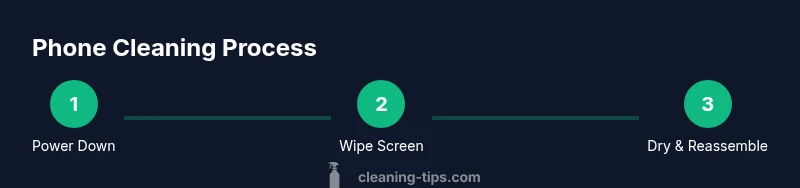
Power down and unplug
Turn off the phone and remove any charging cable or accessories. This minimizes the risk of shorting or moisture reaching internal components. Allow a moment for the device to settle before you start cleaning.
Tip: Starting with a powered-down device reduces risk of damage and makes moisture management easier. - 2
Detach accessories and case
If you use a case, remove it and wipe both the case and the phone gently. Wipe the outer edges of the phone first to remove surface grime before moving to the screen. This prevents recontaminating the screen with dirt from the case.
Tip: Wipe the case separately to avoid transferring grime back onto the phone. - 3
Prepare a safe cleaning solution
Dampen a microfiber cloth with distilled water or a very light amount of 70% isopropyl alcohol. Never spray liquids directly onto the device. Test the cloth on a small, inconspicuous area first to ensure no adverse effect on coatings.
Tip: Use the minimum moisture needed; less is more for electronics. - 4
Clean the screen
Wipe the display with broad, gentle strokes from the center outward in a circular or straight-line pattern. Avoid applying pressure on the screen's edges, ports, or camera area. Check for streaks and re-wipe as needed with a dry section of the cloth.
Tip: Never rub in a back-and-forth motion that could smear oils across the surface. - 5
Clean the body, ports, and lenses
Wipe the back and sides with a light touch. Use a cotton swab or soft brush to remove dust from ports and speaker grills. For camera lenses, use the cloth with minimal moisture to avoid smudges.
Tip: Keep moisture away from openings; moisture in ports can cause corrosion over time. - 6
Dry, reassemble, and test
Let the device air-dry for a minute if you notice any moisture. Reattach the case and accessories, power on, and test the touchscreen, cameras, and fingerprint sensors to confirm everything works smoothly.
Tip: If any residue remains, repeat a light wipe rather than applying more liquid.
Questions & Answers
How often should I clean my phone?
Aim for a quick weekly wipe to remove oils and fingerprints. Do a deeper clean monthly if usage is heavy or you share the device with others. Regular maintenance keeps grime from building up and helps preserve screen clarity.
Clean your phone weekly and do a deeper clean monthly if you share it or use it in dirty environments.
Can I use household cleaners on my phone?
Most household cleaners are too harsh for electronic coatings. Use a damp microfiber cloth with distilled water or a small amount of 70% isopropyl alcohol. Never spray cleaners directly onto the device.
Use a damp microfiber cloth, not spray cleaners directly on the device.
Is it safe to disinfect my phone with alcohol?
Disinfecting with 70% isopropyl alcohol is generally safe when applied to a cloth and used sparingly. Avoid aggressive solvents and excessive moisture near the ports. If in doubt, consult device manufacturer guidelines.
Apply alcohol to the cloth, not directly to the phone, and use sparingly.
Should I clean my phone case separately?
Yes. Clean the case with soap and water or a mild cleaner, then dry thoroughly before reattaching. Cases can accumulate grime that would transfer back to the device if not cleaned.
Clean the case separately and dry it completely before putting it back on.
What if my phone gets wet during cleaning?
Power off immediately and remove any charging accessories. Wipe away excess moisture with a dry microfiber cloth and allow all components to air-dry before powering back on. Do not attempt to dry with heat sources.
If moisture gets in, power off and dry with a cloth before using again.
Can I use vinegar or acetone on my phone?
Avoid vinegar or acetone; they can strip coatings and damage screen layers. Stick to electronics-safe cleaners and plain distilled water when in doubt. When in doubt, skip it and repeat a gentle wipe instead.
Avoid vinegar or acetone on electronics; use electronics-safe cleaners or distilled water.
Watch Video
The Essentials
- Power off before cleaning.
- Use minimal moisture and avoid direct sprays.
- Choose electronics-safe cleaners and tools.
- Inspect for moisture and test functions after cleaning.