How to Clean an Office: A Practical Step-by-Step Guide
Discover a practical, repeatable office cleaning routine with daily, weekly, and monthly tasks. Learn about tools, safe methods, and how to maintain a healthier workspace for homeowners and renters alike.


Clean office productivity starts with a simple, repeatable routine: daily surface wipes, decluttering, and weekly deep cleans. Prioritize high-touch areas like keyboards, door handles, and phones, then vacuum and mop floors. This step-by-step guide helps you implement a practical office-cleaning routine that fits most workplaces. It covers daily, weekly, and monthly tasks, plus tips for shared spaces and health safety.
Why a clean office matters
A clean office isn’t just about aesthetics; it impacts health, productivity, and morale. A tidy workspace reduces the buildup of dust, mold, and allergens, which can trigger allergies or respiratory irritation. It also minimizes clutter that slows decision-making and lowers focus. According to Cleaning Tips, a routine clean can noticeably improve air quality and reduce surface grime in shared spaces. For employers and employees alike, a clean office supports safer, more efficient workdays and a better impression for clients or visitors. Creating a culture of cleanliness starts with small, consistent actions and clear expectations for everyone in the space.
How to set up a cleaning routine
Establishing a predictable cleaning rhythm makes maintenance easier and more sustainable. Start with a simple daily checklist for desks and common areas, then add a weekly deep-clean and a monthly maintenance sweep. Security and hygiene benefit from clearly defined responsibilities, color-coded supply kits, and a logging system to track tasks. Cleaning Tips analysis shows that when teams participate in routine cleaning, consistency improves and tasks are completed more reliably. Build your plan around shifts, shared areas, and high-touch zones to maximize impact while keeping the process practical for real-world offices.
Daily cleaning checklist
Daily cleaning should be quick and deliberate. Start by decluttering surfaces, emptying trash, and wiping desks, keyboards, mice, and phones with a microfiber cloth and an appropriate cleaner. Don’t overlook door handles, light switches, and shared equipment like coffee machines or printers. A fast sweep of the floor to pick up crumbs, followed by a light vacuum or mop where feasible, helps prevent grime from settling. End by restocking essentials (tissue, soap, paper towels) and verifying that all used items are returned to their places. By keeping a short, repeatable routine, you reduce long-term dirt buildup and boost office comfort.
Weekly deep-clean tasks
Weekly tasks target areas that accumulate grime more slowly but still require attention. Move furniture to clean behind and underneath, wipe down window sills, wipe down glass surfaces, and sanitize high-touch equipment in conference rooms. Deep-clean restrooms, replenish supplies, and check air vents for dust buildup. Vacuum carpets thoroughly or steam-clean if needed, and mop hard floors with a cleaner appropriate for the surface. A coordinated weekly deep-clean helps prevent persistent odors and improves overall hygiene, which supports a healthier work environment for everyone.
Cleaning solutions and equipment
Choose cleaning solutions that match your office surfaces and health goals. Use an all-purpose cleaner for desks and surfaces, a disinfectant for high-touch areas, and a glass cleaner for display screens. Microfiber cloths reduce lint and are washable for repeated use. Pair these with basic tools: microfiber mops, a vacuum with appropriate attachments, buckets, spray bottles, and gloves. For eco-conscious offices, select EPA-registered disinfectants with clear instructions and avoid mixing cleaners that release harmful fumes. A simple, well-stocked kit keeps cleaning efficient and effective.
Ergonomics and cleanliness in a shared office
Cleanliness should support comfort and efficiency, not create friction among coworkers. Define zones for different tasks and ensure everyone understands how to store personal items, dispose of waste, and report issues. Ergonomics matters; arrange workstations so cleaning actions don’t require awkward reaches or stretching. Encourage the use of designated cleaning stations or carts in common areas to prevent cross-contamination and keep supplies organized. A well-planned layout reduces friction and makes cleaning easier for everyone involved.
Dealing with common office messes
Spill incidents, crumbs, and dusty electronics are common but manageable with a rapid response plan. Wipe spills promptly with appropriate cleaners to prevent sticky residues and staining. For electronics, use alcohol-based wipes on keyboards and screens, and avoid moisture settling into ports. Filtration and ventilation play a role in minimizing odors; ensure vents are clean and filters are replaced on schedule. Regular touch-ups and a standardized routine help keep problem areas under control and prevent small messes from becoming big headaches.
Health, safety, and air quality considerations
A clean office supports better air quality and fewer health issues. Ensure proper ventilation during cleaning, especially after disinfectants are applied. Store chemicals securely and label all containers. Use gloves when handling cleaners and never mix products like bleach and ammonia. Regular cleaning reduces particle buildup, which benefits indoor air quality and reduces the risk of irritants entering the breathing zone. Aligned with Cleaning Tips guidance, maintaining cleanliness is a practical step toward a healthier workspace.
Decluttering digital spaces and desk organization
A tidy desk reduces cognitive load and improves focus. Encourage employees to store documents digitally when possible, scan or shred unnecessary papers, and keep essential items within arm’s reach on a clean surface. A simple filing system and a designated desk tray system can significantly reduce desk clutter. Periodic prompts to organize digital files, folders, and email can prevent clutter from creeping back and help sustain an orderly office environment.
Tools & Materials
- microfiber cloths(Washable; use color-coded sets)
- all-purpose cleaner(Use on non-porous surfaces)
- disinfectant spray or wipes(EPA-registered; follow label directions)
- glass cleaner(For screens and glass surfaces)
- duster (extendable)(Cobwebs and hard-to-reach areas)
- vacuum cleaner(With HEPA filter if possible)
- mop and bucket(Appropriate cleaner for floors)
- trash bags(Lint-free, strong bags)
- nitrile gloves(Protect hands during disinfection)
- face masks(Optional for dusty areas)
- squeegee(Windows and glass surfaces)
- spray bottle(Fill with cleaners)
Steps
Estimated time: 60-90 minutes
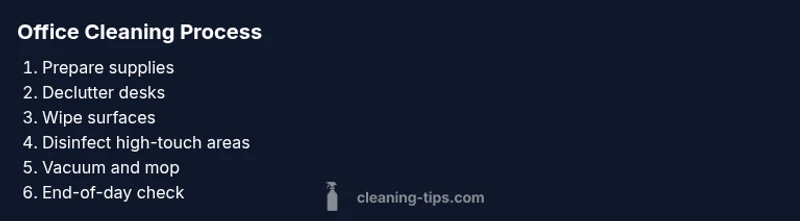
- 1
Prepare your cleaning kit
Gather all supplies and place them in a clean cart or designated area. Check stock levels and refill before starting. This ensures you won’t have to interrupt the routine to fetch items.
Tip: Keep a spare set of cloths and a small tool kit for quick repairs or adjustments. - 2
Declutter desks and common areas
Clear away personal items, papers, and trash from desks. Place items in a designated bin or drawer to prevent re-mess during cleaning. This step makes surface cleaning more effective and prevents missed spots.
Tip: Encourage staff to adopt a ‘clear desk’ habit at end of day to simplify morning cleaning. - 3
Wipe high-touch surfaces
Start with keyboards, mice, phones, door handles, and light switches using microfiber cloths and an appropriate cleaner. Avoid applying too much liquid to electronics and follow device manufacturer guidelines.
Tip: Use color-coded cloths for different areas to avoid cross-contamination. - 4
Vacuum and mop floors
Vacuum carpets thoroughly, paying attention to edges and under furniture. Mop hard floors with a cleaner suitable for the surface, allowing floors to dry before use. This reduces tracked-in dirt and helps prevent slip hazards.
Tip: Work from the far end of the room toward the exit to avoid re-cleaning already-clean areas. - 5
Disinfect shared equipment
Wipe shared devices such as coffee machines, printers, and conference room controls with appropriate disinfectant. This reduces the risk of cross-contamination in high-traffic areas.
Tip: Post a simple cleaning schedule near the equipment to remind users to wipe down surfaces after use. - 6
Tidy and sanitize restrooms
Clean and disinfect sinks, toilets, and touch surfaces. Refill soap, paper towels, and toilet paper. Check for mold or mildew and address promptly.
Tip: Ventilate briefly during disinfection and ensure proper waste disposal. - 7
End-of-day quick check
Scan for missed spots and return supplies to their places. Empty trash and ensure all areas are left in a ready state for the next day. Document any issues for maintenance.
Tip: Keep a short log of tasks completed for accountability.
Questions & Answers
How often should an office be cleaned to maintain a healthy environment?
Most offices benefit from a daily surface wipe, trash removal, and tidy desks, with a weekly deep-clean of all areas. Restrooms and kitchens may require additional attention based on usage. Adapt the schedule to your team size and traffic.
Offices generally do a daily surface wipe and weekly deep-clean; adjust as needed for your team and traffic.
What supplies are essential for cleaning an office?
A basic kit includes microfiber cloths, an all-purpose cleaner, a disinfectant, a glass cleaner, a vacuum, mop and bucket, trash bags, gloves, and a spray bottle. Keep extra replacements and a small cart for mobility.
Essential supplies are microfiber cloths, cleaners, a vacuum, mop, trash bags, gloves, and a spray bottle.
Is it safe to disinfect electronics like keyboards and screens?
Yes, use isopropyl-alcohol-based wipes or cleaners designed for electronics. Apply lightly and avoid excess moisture. Always follow device manufacturer guidelines and power down devices before cleaning.
Yes, clean electronics with electronics-safe wipes and minimal moisture, following device guidelines.
How should restrooms be cleaned in an office?
Clean and disinfect sinks, toilets, and surfaces daily. Refill consumables, check for leaks, and ensure good ventilation. Document issues for maintenance if problems persist.
Restrooms should be cleaned daily, with restocking and ventilation for safety.
Can DIY cleaners be effective for office cleaning?
DIY cleaners like vinegar and baking soda can handle general tasks, but use them appropriately and avoid mixing with incompatible products. For high-touch disinfection, EPA-registered products are recommended.
DIY cleaners work for simple tasks, but use EPA-registered disinfectants for high-touch areas.
How can we encourage employees to maintain cleanliness?
Set clear expectations, provide easy access to cleaning supplies, and create quick routines staff can perform at the end of the day. Regular reminders help sustain habits.
Set clear rules, provide supplies nearby, and remind staff to keep spaces tidy daily.
What safety precautions should we take when cleaning?
Wear gloves, avoid mixing cleaners, ventilate spaces, and store chemicals safely. Keep a first-aid kit and ensure staff know whom to contact for spills or exposures.
Wear gloves, don't mix cleaners, ventilate rooms, and store chemicals safely.
Watch Video
The Essentials
- Create a repeatable daily/weekly cleaning routine.
- Prioritize high-touch areas to maximize impact.
- Use the right tools and cleaners for each surface.
- Involve staff in maintaining a clean, organized workspace.
- Protect health with safe chemical practices and proper ventilation.